Third-party download portals carry more risk than official vendor sites, and the moment you spot multiple download buttons, a forced installer, or a redirect you didn't ask for, the right move is to stop, close the tab, and verify before opening anything. Check the domain with a safety tool, then scan any file you already downloaded with antivirus software before you run it. The checklist and cleanup steps below walk you through both.
TL;DR:
- Most unsafe download sites use deceptive tactics like multiple download buttons, redirects, or mismatched file details to trick users into installing malware.
- Browser safety tools like Google Safe Browsing detect known malicious sites, but they do not always catch newly established or cleverly hidden threats.
- Downloading directly from official vendor sites or trusted repositories significantly reduces the risk compared to third-party portals, which often bundle unwanted programs or malware.
- If a file has no digital signature or does not match the publisher's details, it is a strong indicator of potential risk, requiring further verification before running.
- Using a site safety checker before clicking download links can provide a quick risk assessment, but layered defenses and verification remain essential to avoid infection.
Table of Contents
- What Makes a Download Site Unsafe
- How Browser Warnings and Google Safe Browsing Protect You
- Common Deceptive Tactics on Download Portals
- What to Do If You Already Downloaded or Ran a File
- How a Site Safety Checker Fits Into This Workflow
- What Actually Keeps You Safe (An Editorial Take)
- Check a Suspicious Site Before You Click Download
- Sources
- FAQ
What Makes a Download Site Unsafe
Unsafe download sites share a small set of habits, and once you know what to look for, most of them stand out within seconds. The giveaway is rarely subtle. It's usually a page trying too hard to get you to click something.
Watch for these signs before you download anything:
- Multiple "Download" buttons on one page, often in different colors, where only one leads to the real file.
- A forced download manager or wrapper app instead of the actual installer you asked for.
- A domain that's brand new or barely resembles the software's real name (extra words, odd suffixes like .xyz or .top).
- A chain of redirects between your click and the actual file landing page.
- Mismatched file details, where the filename, version number, or listed publisher doesn't match what the software vendor actually ships.
- HTTPS and a padlock icon, which only confirm your connection is encrypted, not that the file itself is safe.
- A gap between the link you hover over and where the click actually sends you.
- No user reviews, or reviews that read like they were written by the same person in five minutes.
- No visible scan results from services like VirusTotal.
- A missing or unverifiable digital signature on the installer once you download it.
One study of 41 deceptive download sites found that the visible link often pointed somewhere legitimate, but the actual click handler routed visitors to an entirely different installer. The link you see and the link you get are not always the same thing.
Pro Tip: Right-click any download link and copy the URL before clicking. If the copied address looks nothing like the domain you're standing on, that mismatch alone is reason enough to walk away.
How Browser Warnings and Google Safe Browsing Protect You
Chrome, Firefox, and most modern browsers rely on Google Safe Browsing to flag phishing pages, malware hosts, and unwanted software before you land on them. When it works, you'll see a full-page red or gray warning instead of the site itself. Enhanced Safe Browsing, a setting available in Chrome, checks pages against Google's lists in closer to real time and adds a layer of protection standard mode doesn't offer.
Here's the limitation nobody tells you upfront:
- Safe Browsing catches sites it has already indexed as malicious, not ones that went live an hour ago.
- Traffic Distribution Systems can serve a clean version of a page to Google's crawlers and a malicious version to real visitors, delaying detection.
- A green padlock only confirms encryption between your browser and the server. It says nothing about whether the file on the other end is safe.
Turn on Enhanced Safe Browsing in your browser's privacy settings, but don't treat the absence of a warning as a clean bill of health; if you do encounter browser security alerts, you can find practical steps in the guide to fixing "This Site May Be Hacked" messages. Pair it with a site-status check before you trust an unfamiliar domain, especially one you found through search rather than a direct link from the vendor.
Common Deceptive Tactics on Download Portals
Most unsafe download sites don't look sketchy at a glance. They look almost right, which is the entire point.
Click hijacking is the most common trick. The link you hover over shows a legitimate destination, but a script intercepts your click and sends you somewhere else entirely. Malwarebytes documented dozens of sites running exactly this pattern, where a visible legitimate link led to an unrelated installer the moment you clicked.
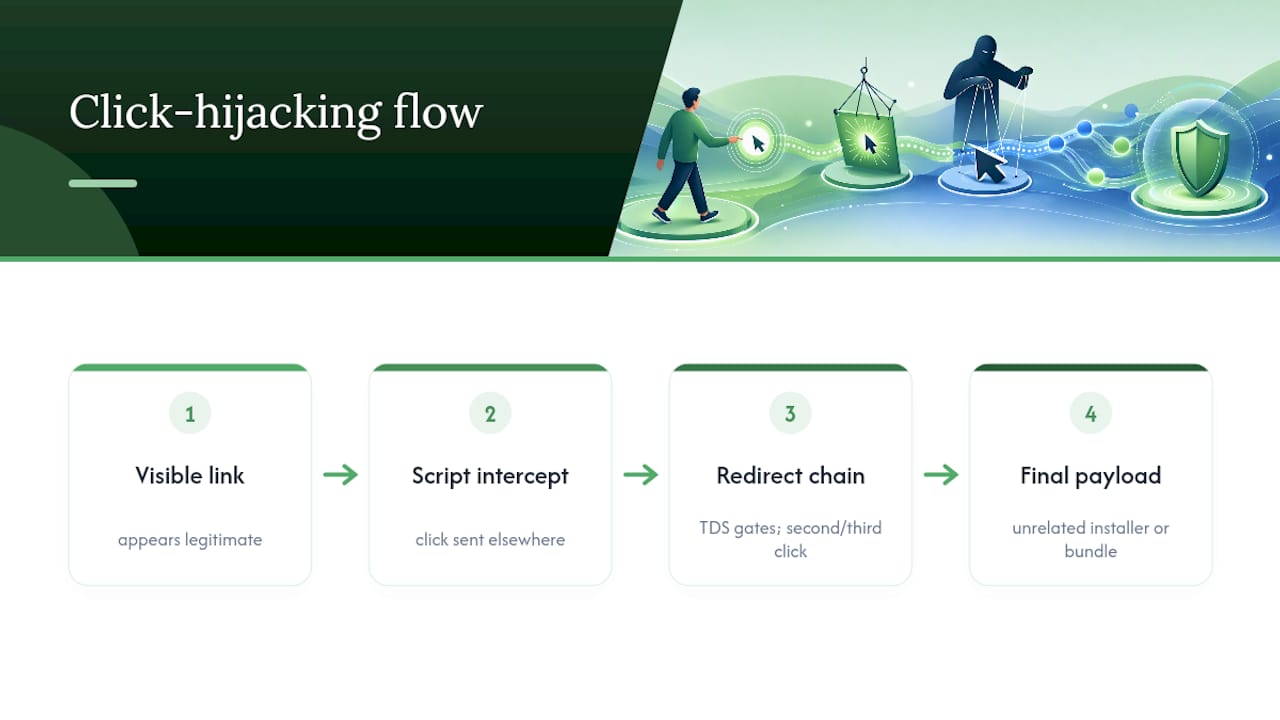
Traffic Distribution Systems (TDS) take it further. These gate content based on who's visiting, showing clean pages to security scanners and bots while serving malware to ordinary users on their second or third click through a redirect chain. That's how a site can pass a casual scan and still infect visitors.
Bundleware is the quieter problem. Ad-supported portals like Softonic have a documented history of wrapping legitimate downloads in installers that add browser toolbars, trackers, or other unwanted programs, tracked by Malwarebytes as PUP.Optional.Softonic.
Heise's own testing found campaigns where fake pages displayed correct-looking links, then delivered different or bundled software once clicked, concluding the only reliable fix is to download directly from the official developer's site whenever one exists.
What to Do If You Already Downloaded or Ran a File
If you've already clicked through, work the problem in order rather than panicking through random fixes.
- Disconnect from the internet if you ran the file and something felt off immediately, such as a flash of a command window or unexpected pop-ups. This limits any data the malware can send out while you work.
- Run a full system scan with your antivirus software rather than a quick scan, since bundled installers often drop files outside the usual startup folders.
- Upload the suspicious file to VirusTotal if you still have it, which checks it against dozens of antivirus engines at once instead of just your own.
- Check the file's digital signature in its properties. An unsigned installer, or one signed by a publisher that doesn't match the software name, is a strong warning sign.
- Compare the checksum against the one listed on the vendor's official page, if provided.
- Review your browser extensions, startup programs, and running processes for anything unfamiliar, and remove or quarantine what you find.
- Reinstall the operating system if scans keep finding new threats after removal, or if you handled anything sensitive, like banking, on the same device shortly after.
Pro Tip: Screenshot the file's properties panel before you delete anything. If you need to report the incident or dispute a charge later, that publisher and signature information is hard to recover after the fact.
How a Site Safety Checker Fits Into This Workflow
Running each of these checks by hand takes time you don't always have when you're standing on an unfamiliar page. A tool like Verified fyi pulls signals like Google Safe Browsing status, VirusTotal results, WHOIS registration data, and reputation telemetry into a single 0 to 100 trust score, so you get a fast read before you commit to a click.
Paste a URL and you'll see it sorted into a clear category:
- Dangerous or suspicious, meaning stop immediately.
- Caution, meaning proceed only if you can verify the file separately.
- Mostly safe or trusted, meaning the domain checks out, though you should still verify the file itself once downloaded.
Treat the score as your first filter, not your last. Still check the file's signature after it lands on your device.
What Actually Keeps You Safe (An Editorial Take)
Most safety advice treats this as a one-time skill: learn the red flags, apply them, move on. That's not how it works in practice. The sites change their tricks faster than any checklist can keep up, which is why the habit matters more than the memory. Default to official sources first, every time, even when the third-party portal ranks higher in search results. Verify before you run anything, not after something feels wrong. Layer your defenses: a site check, a file scan, a signature check. No single step catches everything, and that's fine. The goal isn't eliminating risk. It's stacking enough friction that the sloppy attacks bounce off and the sophisticated ones slow down long enough for you to notice.
— Nick
Check a Suspicious Site Before You Click Download
You don't need to memorize every red flag in this article to stay protected. Paste the URL into Verified fyi before you click a single download button, and you'll get a trust score built from Google Safe Browsing status, VirusTotal scan data, WHOIS records, and reputation signals in seconds, not an hour of manual checking.

It's free, it takes less time than reading a single product review, and it works on any domain, not just the big names you'd already recognize as risky. Browse recently checked websites to see what a dangerous score actually looks like next to a trusted one, so you know what you're watching for. Next time a download link looks even slightly off, run it through the checker first. That thirty seconds is cheaper than a reinstall.
Sources
The single biggest risk reducer is skipping third-party portals entirely when an official source exists. Go straight to the vendor's own site, an app store, or, for open-source tools, the project's verified GitHub releases page or an established package manager.
Beyond source selection, a few habits compound over time:
- Google Safe Browsing
- Fake open-source and freeware download portals are used as malware delivery surfaces (Trojan-Killer / research summary)
- Fake pages promote fake software with trustworthy links | Heise Online
FAQ
Which download sites are safe?
Official vendor sites, established app stores, and verified GitHub release pages are the safest options, since they cut out the third-party intermediary that adds most of the risk. When you're unsure about a specific portal, running the domain through a checker like Verified fyi gives you a fast trust reading before you commit.
What are unsafe downloads?
Unsafe downloads are files that carry malware, bundled unwanted programs, or trackers disguised as the software you actually wanted, often delivered through misleading buttons or redirect chains rather than the direct link you clicked.
What are some unsafe websites?
Unsafe websites include fake open-source mirrors, ad-heavy third-party portals with forced download managers, and lookalike domains that mimic a real vendor's name with a slightly altered spelling or suffix. Reviews of flagged domains, like this one, show what those deceptive patterns look like in practice.
Is Softonic safe?
Softonic isn't inherently malicious, but its ad-supported model and history of bundled installers, tracked by Malwarebytes as PUP.Optional.Softonic, mean you should scrutinize what you're actually installing rather than trusting the portal by default.
Is SourceForge safe, and are FileHippo, APKMirror, or APKPure safe?
These platforms are generally more reputable than obscure portals, but none are risk-free. SourceForge has had past incidents involving fake or hijacked project pages, and APK mirror sites in particular carry added risk since sideloaded Android apps skip the vetting that official app stores apply.