Yes, Depop is generally safe for buying and selling when you use its in-app payment system and follow platform rules. The real danger isn't the app itself. It's what happens when a buyer or seller steps outside it. Depop Protection covers eligible purchases made with the BUY button, but the moment a conversation moves to Venmo, Zelle, or a "just send cash" DM, that safety net disappears.
TL;DR:
- Depop Protection covers eligible in-app purchases made through the BUY button, but it does not apply if payment requests shift to external platforms like Venmo or Zelle.
- Buying outside the platform or paying through off-platform links exposes you to scams, as Depop Protection becomes unavailable once money leaves the app.
- Always verify unfamiliar seller links with a safety check tool before clicking or paying, since scammers often use fake URLs to impersonate trusted sites.
- Using tracked shipping, keeping records, and communicating only within Depop helps both buyers and sellers prevent disputes and fraud.
- Relying solely on accounts with minimal history or new seller profiles increases risk, as Depop does not verify identities beyond payment fraud detection.
Table of Contents
- Is Depop Safe? How Depop Protection and In-App Payments Work
- Common Depop Scams and the Red Flags That Give Them Away
- How to Buy Safely on Depop: A Practical Checklist
- How to Sell Safely on Depop
- Account Security: 2FA, Passwords, and Phishing Awareness
- What to Do If Something Goes Wrong: Disputes and Refunds
- Checking Unfamiliar Seller Links Before You Click or Pay
- Who's Responsible for What: Buyer and Seller Best Practices
- How Depop Verifies Users, and Where That Verification Falls Short
- Privacy and Data Protection on Depop
- A Simple Rule for Staying Safe on Any Marketplace
- Verify Any Seller Link Before You Trust It
- Sources
- FAQ
Is Depop Safe? How Depop Protection and In-App Payments Work
Depop Protection is the platform's built-in insurance policy for buyers, and it's the single biggest reason the answer to "is Depop safe" leans toward yes. It automatically covers eligible in-app purchases that never arrive, show up damaged, or turn out significantly different from the listing description, as long as you report the problem within 30 days of purchase.
That coverage comes with real boundaries, though. Here's what actually determines whether you're protected:
- Eligibility requires the BUY button. Only purchases made through Depop Payments on the app or depop.com qualify.
- Accepted payment methods include debit and credit cards, Apple Pay, Google Pay, and Klarna in supported markets.
- PayPal complicates things. If you paid through PayPal, Depop typically wants proof that PayPal denied your claim before it will consider a secondary one.
- It's not insurance. Depop Protection is a discretionary resolution process, not a guaranteed payout.
- Exclusions exist for parcels marked delivered by tracking, off-platform payments, and prohibited items.
Understanding these limits before you buy is what separates a smooth refund from a frustrating dead end.
Common Depop Scams and the Red Flags That Give Them Away
Most Depop scams follow a predictable pattern, and once you know the shape, they're easy to spot.
- Off-platform payment requests. A seller asks you to pay through Venmo, Zelle, or PayPal's Friends and Family option instead of the BUY button. This is the single biggest red flag on the platform. Once money leaves Depop's system, Depop Protection no longer applies.
- Fake or recycled photos. Watch for stock images, watermarks from other sites, or measurements that don't match the item shown.
- Prices that don't make sense. A designer bag at a fraction of resale value is bait, not a bargain.
- Sellers who dodge tracking. If someone refuses to ship with a trackable label or pushes for an in-person meetup outside Depop's policies, walk away.
- Phishing emails. Fraudsters impersonate Depop support using lookalike addresses and urgent links asking for login details or payment info.
Security researchers who track these patterns point to one common thread: scammers lean on friendly, casual DM conversations to build trust fast, then pivot to a request that breaks platform rules. The friendliness is the tactic, not a sign of legitimacy.
How to Buy Safely on Depop: A Practical Checklist
Depop buyer safety comes down to a handful of habits repeated every time you shop.
- Always tap BUY inside the app and confirm the charge processed through Depop Payments, not a separate app or link.
- Check the seller's history, review count, and how recently they've shipped items.
- For expensive pieces, ask for extra photos, close-ups of tags, or proof of authenticity before paying.
- Insist on tracked shipping and make sure the tracking number is logged in your in-app order.
- Screenshot the listing, your messages, and your receipt the moment you buy, not after a problem starts.
- Open a dispute immediately if something feels wrong. Waiting costs you time inside your 30-day window.
Pro Tip: If a seller sends you a separate payment link or an "authentication" website you've never heard of, don't click it blind. Running the domain through a safe online shopping checklist or a quick site check takes fifteen seconds and can save you a chargeback fight.
How to Sell Safely on Depop
Sellers face a different set of risks, mostly around disputes and account flags rather than outright theft. A few habits protect you on both fronts.
- Write accurate descriptions, include real measurements, and photograph flaws honestly rather than cropping them out.
- Use Depop's own shipping labels and tracked services, then attach the tracking number to the order the same day you ship.
- Never encourage a buyer to pay outside the app, even if they offer to cover fees. It voids your protection too.
- Keep every conversation inside Depop's messaging system so there's a record if a dispute opens.
- Hang on to proof of postage and packaging photos until the transaction window closes.
Depop's own safety guidance backs this up directly: stay on the app, ship with tracking, and never hand over personal details to a buyer who asks.
Account Security: 2FA, Passwords, and Phishing Awareness
Depop payment security starts before you ever list or buy anything, at the account level.
- Turn on two-factor authentication and use a unique password, ideally generated and stored in a password manager.
- Real Depop emails come from depop.com domains. Anything asking you to "verify payment" through an outside link is phishing.
- Keep your phone's operating system and the Depop app updated to close known security gaps.
- If you suspect your account is compromised, report it to Depop immediately, change your password, revoke any connected app access, and check your payout settings for unfamiliar changes.
What to Do If Something Goes Wrong: Disputes and Refunds
If a purchase goes sideways, the process is fairly mechanical as long as you move fast.
- Open a dispute through Depop's Dispute Resolution Center within 30 days of purchase.
- If you paid via PayPal, file a PayPal dispute first. Depop generally requires proof that PayPal denied the claim before it opens its own.
- Gather evidence: photos of the item, tracking history, your message thread with the seller, and your receipt. Keep the item itself if Depop asks for inspection.
- Expect discretion, not automatic approval. If tracking shows the parcel delivered, your claim gets harder. A denied Depop claim doesn't erase other legal options against the seller, but it does mean the platform's fastest fix is off the table.
Checking Unfamiliar Seller Links Before You Click or Pay
Depop's protections cover a lot, but they stop at the edge of the app. The moment a seller sends you an outside link, whether it's a "verification" site, a separate storefront, or a payment page, you're in territory Depop Protection doesn't reach.
That's the same category of check Verified fyi runs, compressing over 200 signals into a single 0 to 100 score.
The situational rule is simple: if a Depop seller sends you a link you don't recognize, paste it into a checker before you click or pay. A low trust score doesn't prove a scam, but it's exactly the kind of warning sign that should make you pump the brakes. This step doesn't replace Depop's in-app dispute system. It catches the exact gap that system can't cover, the fraud that happens before you've even spent a dollar on the platform.
- Verification adds a layer for links, not for in-app transactions Depop already protects.
- Ownership age and reputation history often reveal a scam site faster than a gut feeling does.
- A quick check costs nothing and takes less time than typing out a dispute.
Who's Responsible for What: Buyer and Seller Best Practices
Depop's safety system only works when both sides hold up their end. Buyers control most of the risk before checkout: verifying a seller's history, asking questions about condition and sizing, and refusing to pay outside the app no matter how convincing the excuse sounds. A seller who claims Depop Payments is "glitching" and asks for Venmo instead isn't solving a technical problem. They're routing around the platform's fraud protection.
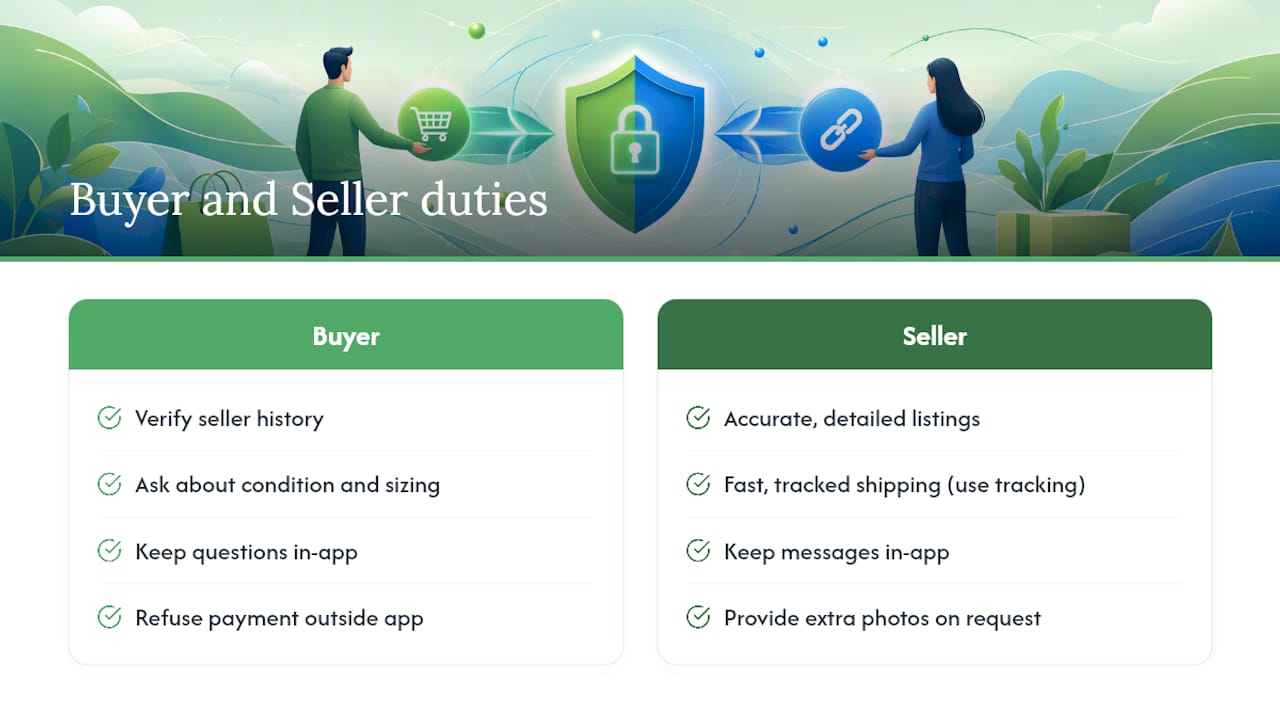
Sellers carry a matching set of duties. Accurate listings prevent the "significantly not as described" disputes that eat up time and damage seller ratings. Fast, tracked shipping protects sellers just as much as buyers, since tracking data is often the deciding factor when Depop reviews a claim. A seller with no tracking number and a buyer claiming non-delivery has almost no way to prove otherwise.
Communication matters more than either side usually expects. Keeping every question, complaint, and negotiation inside Depop's messaging system means there's a paper trail if a dispute opens. Buyers who slide into direct messages or texts to "make things easier" lose that trail, and so do sellers who agree to it.
The pattern holds across the marketplace: the accounts that avoid disputes are the ones that document everything and never treat platform rules as optional friction. Sellers who ship late, ignore messages, or push back on providing extra photos tend to accumulate complaints even when they're not running an outright scam. That reputation follows the account, and Depop does weigh seller history when a claim comes down to a judgment call.
How Depop Verifies Users, and Where That Verification Falls Short
Depop doesn't run the kind of identity verification you'd see on a bank app. Signing up mainly requires an email address or a linked social account, a username, and basic profile details. There's no government ID check for casual buyers or sellers, which keeps the barrier to entry low but also means anyone can create an account with minimal friction.
Where Depop's system does add real scrutiny is on the payment side. Depop Payments, the in-app processor, runs its own fraud detection on transactions, and payout verification exists for sellers who want to withdraw earnings. That's a meaningful checkpoint, since it forces money to flow through a monitored system rather than directly between two anonymous accounts.
The limitation is straightforward: verification protects the transaction, not the person. A seller can have a brand-new account with zero sales history and still list items today. That's why review history and account age matter so much when you're deciding whether to trust a particular seller, especially for higher-priced items. Depop's system is built to catch payment fraud patterns at scale, not to vouch for any individual seller's character. Treat a thin sales history and no reviews as a reason to ask more questions, not as proof of a problem, but definitely not as a green light either.
Privacy and Data Protection on Depop
Depop collects the data you'd expect from any marketplace app: your name, email, shipping address, payment details processed through Depop Payments, and browsing or search activity used to personalize listings. Depop operates as part of Etsy, which acquired the platform, and data handling follows policies published under that ownership structure.
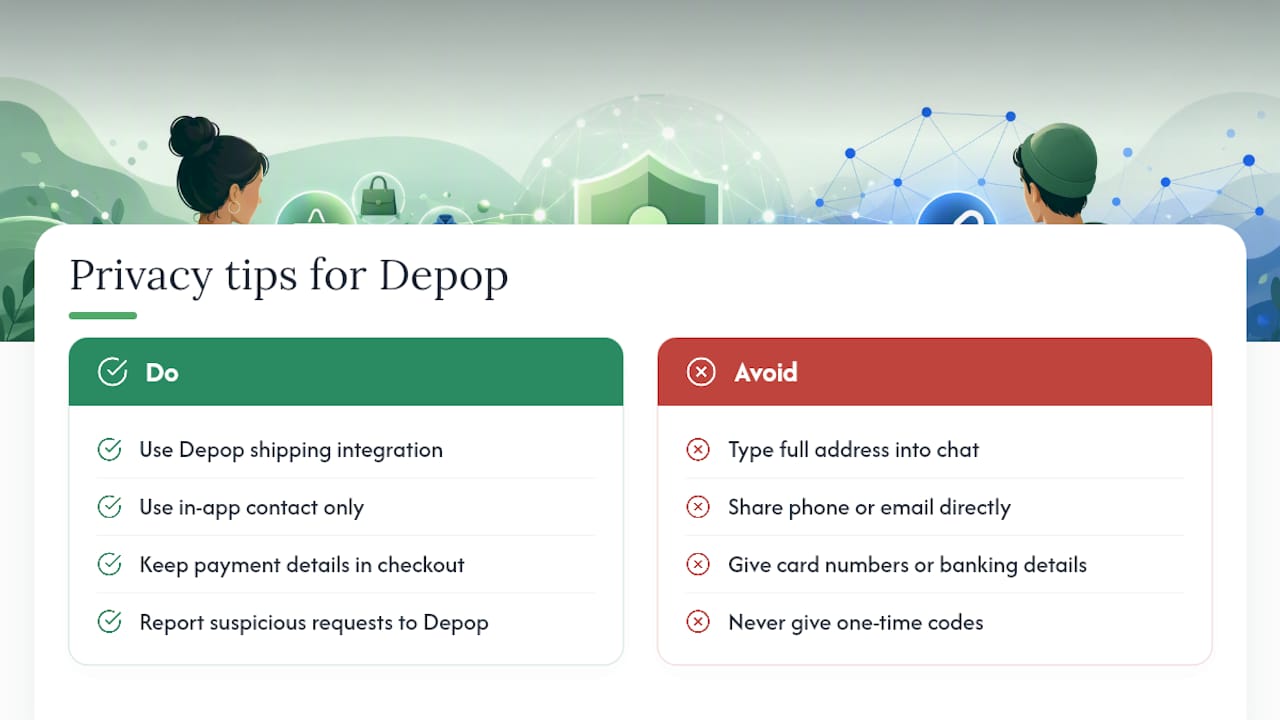
The practical privacy risk for most users isn't Depop's own data handling. It's what you volunteer in conversations with strangers. Sellers and buyers sometimes share more than necessary during a transaction, home addresses beyond what's needed for shipping, phone numbers, or payment app usernames requested by a scammer posing as tech support. None of that oversharing is required by Depop's actual checkout process.
A few habits limit your exposure. Let Depop's shipping integration handle address information rather than typing your full address into a chat message. Avoid sharing your phone number or email with a buyer or seller who asks for it directly instead of using in-app contact. And treat any request for banking details, card numbers, or one-time codes as an automatic red flag. Depop never needs your card number outside of its own secured checkout, and legitimate customer support will never ask for a one-time verification code over DM.
A Simple Rule for Staying Safe on Any Marketplace
After looking at how most Depop disputes actually unfold, one pattern stands out: the buyers and sellers who get burned are almost always the ones who left the app's protections behind first. My own rule of thumb is boring but effective: if a deal only works when it leaves the platform, it's not a deal worth making. That's true whether it's a $12 t-shirt or a $400 handbag.
Working in web trust and safety analysis for years has shown me that fraud rarely hides. It waits for someone to skip a step. Stay on-platform, keep your receipts, and treat urgency as a warning sign, not a reason to rush.
— Nick
Verify Any Seller Link Before You Trust It
Depop's own protections stop at the edge of the app, but scammers count on you clicking a link before you stop to think. You can check that link first by pasting any URL into a free tool that provides a 0 to 100 safety score based on various security and reputation signals.

This isn't a replacement for Depop Protection. It's the check you run before a transaction even starts, when a seller sends you an "authentication" site or a payment page that doesn't look quite right. Browse recently checked websites to see real examples of flagged and cleared sites, or head straight to Verified and paste in the link you're unsure about. It takes seconds, and it costs nothing.
Sources
- Depop Protection for buyers – Depop Help Centre
- Depop scams (Bitdefender coverage)
- Depop Review 2026: Legit & Safe? Trust Score 71/100
FAQ
Is It Safe to Buy From Depop?
Buying on Depop is generally safe when you pay through the BUY button and keep communication in-app, since that's what makes you eligible for Depop Protection. Risk rises sharply the moment a seller asks you to pay outside the platform.
Will Depop Refund Me if I Got Scammed?
If your purchase qualifies for Depop Protection and you report it within 30 days, Depop can issue a refund, but the process is discretionary and depends on evidence like tracking status and seller history. Payments made outside the app typically aren't eligible.
What Are the Downsides of Using Depop?
The main drawbacks are inconsistent seller quality, limited identity verification for new accounts, and a refund process that leans heavily on you providing your own evidence. Independent trust reviews rate Depop as legitimate overall but flag these marketplace variability issues.
Is It Safe to Enter My Bank Information on Depop?
Entering payment details through Depop's official in-app checkout, Depop Payments, is safe since it's a secured processor. It's never safe to send card numbers, bank details, or one-time codes to another user through direct messages.
What's the Fastest Way to Check if a Depop Seller's Link Is Legitimate?
Paste the link into a site verification tool like Verified fyi to get an instant trust score before clicking or paying, especially for links promising "authentication" or off-platform deals.