Malware hosting detection is the process of identifying when malicious files or payloads are being stored and distributed through hosting infrastructure, whether that's a legitimate cloud service, a code repository, or a compromised web server. The immediate priority for any defender: watch for documents or scripts that reach out to trusted cloud URLs to pull down secondary payloads, because that pattern bypasses most domain-reputation controls entirely. Services like VirusTotal, Google Safe Browsing, and Verified fyi give you a fast first pass on any suspicious URL or file before you commit time to deeper analysis.
Quick triage checklist:
- Check any suspicious URL against Verified fyi or VirusTotal before opening it
- Review proxy and DNS logs for raw repository URLs (e.g.,
raw.githubusercontent.com,pastebin.com) - Flag any Office document or PDF that spawns PowerShell, curl, or wget
- Look for high-entropy file downloads from cloud storage APIs (AWS S3, Google Drive, OneDrive)
- Isolate the endpoint if any of the above fire, then escalate to sandbox analysis
Key Takeaways
Malware hosting detection requires layered telemetry, modern ML-assisted tools, and a repeatable triage workflow because signature-based controls alone cannot catch hosted payloads delivered through trusted cloud infrastructure.
| Point | Details |
|---|---|
| Signature detection has limits | Polymorphic and obfuscated hosted payloads evade hash-based controls; ML and behavioral analysis are required. |
| Top telemetry to watch | Proxy logs for raw repository URLs, EDR process trees for script spawning, and cloud access logs for anomalous API calls. |
| Layered tooling wins | Combine EDR (CrowdStrike Falcon), public scanners (VirusTotal, Google Safe Browsing), and vulnerability scanning (Nessus) for full coverage. |
| Follow the workflow | Ingest, triage with public scanners, static analysis, sandbox, hunt, contain, then remediate in that order. |
| Verified fyi for fast triage | Paste any suspicious URL into Verified fyi for an instant 0–100 trust score before downloading or escalating. |
Table of Contents
- What is malware hosting detection, and why does it matter?
- Why signature-based detection often fails against hosted malware
- Concrete indicators and telemetry that suggest hosted malware
- Which tools and platforms help you detect hosted malware?
- A practical detection and response workflow for organizations
- How to hunt for hosted malware and run a forensic analysis
- How to reduce the risk of hosting or downloading malware
- How to verify a suspicious host or download before you act
- The detection gap most organizations underestimate
- Verified fyi gives you an instant safety check on any suspicious URL
- Sources
- FAQ
What is malware hosting detection, and why does it matter?
Malware hosting detection sits at the intersection of web security and endpoint defense. According to CrowdStrike, adversaries store and distribute malicious files using legitimate, trusted infrastructure such as cloud platforms, code repositories, and file-sharing applications. The goal is simple: inherit the provider's reputation so the download looks clean to signature-based filters that block known-bad domains.
The attack chain often looks like this:
- A phishing email delivers a Word document with a macro
- The macro calls PowerShell, which fetches a payload from a trusted cloud URL
- The payload executes, establishes persistence, and phones home via a C2 channel also hosted on a legitimate service
Defenders should treat sanctioned-app traffic as a transactional risk, not a trusted channel. A file coming from OneDrive or GitHub is not automatically safe — it is only as trustworthy as whoever uploaded it.
Attackers also use underground hosting for higher-risk infrastructure, but legitimate cloud services are preferred for initial delivery because they rarely get blocked wholesale. Fast payload swaps, mean the same URL can serve different malware to different victims within hours, making hash-based detection alone unreliable.
Why signature-based detection often fails against hosted malware
Traditional signature detection compares file hashes or byte patterns against a database of known-bad samples. That works well for commodity malware that doesn't change. Against hosted payloads, it breaks down for three reasons: polymorphism (the file mutates on each download), code obfuscation (the malicious logic is buried under layers of encoding), and the simple fact that a brand-new payload has no signature yet.
Research published in 2025 via Springer Nature documents this arms race directly, showing that ML and deep-learning models are now required to identify obfuscated and evolving malware that signature-only systems miss. The shift is not theoretical; it reflects a real gap in production defenses.
Modern detection approaches that fill that gap:
- Static analysis: Examine file structure, imports, and entropy without executing the file
- Behavioral/dynamic analysis: Run the file in a sandbox and watch what it actually does
- ML and deep-learning models: Train on feature vectors (byte n-grams, API call sequences, control-flow graphs) to generalize across unseen variants
- Cloud-assisted and federated detection: As described in the MDPI Algorithms review, local sensors forward telemetry to centralized cloud services that update reputation graphs and models globally, enabling faster zero-day recognition through aggregated signals
No single approach covers everything. Sandboxes can be evaded by malware that detects virtualization. ML models can be fooled by adversarial inputs. Layering all four approaches is what closes the gaps.
Concrete indicators and telemetry that suggest hosted malware
The signals below are what your detection pipeline should be ingesting and correlating. Each one alone is a weak signal; two or more together warrant immediate investigation.
| Signal | Data Source | Why It Matters |
|---|---|---|
| Unknown or mismatched file hash | EDR, Nessus scan | Known-bad hash confirms malware; unknown hash warrants sandbox |
| High file entropy | EDR, static analysis tool | Packed or encrypted payloads consistently show high entropy |
| Raw repository URL in proxy logs | Web proxy, SIEM | Legitimate apps rarely pull executables from raw GitHub or Pastebin |
| Document spawning PowerShell/curl | EDR process tree | Classic staged-download behavior; almost never benign |
| Anomalous egress to cloud storage APIs | Firewall, cloud access logs | Data exfil or C2 beaconing disguised as normal cloud sync |
| Suspicious file extensions (.exe, .ps1 via .docx) | Web proxy, email gateway | Extension mismatch or double extension is a consistent red flag |
| DNS queries to newly registered domains | DNS resolver logs | C2 infrastructure is often registered days before a campaign |
Per CyberDefenders, effective defenses require inspecting sanctioned-app downloads and filtering egress to cloud APIs, not just blocking known-bad domains.
Which tools and platforms help you detect hosted malware?
Each tool category plays a distinct role. No single platform covers the full detection chain.
- EDR (Endpoint Detection and Response): Platforms like CrowdStrike Falcon provide real-time process telemetry, file-hash lookups, and behavioral detection at the endpoint. CrowdStrike Falcon also functions as a CNAPP (Cloud-Native Application Protection Platform), giving visibility into cloud workloads and container activity where hosted payloads often land first.
- Sandboxing and dynamic analysis: Automated sandboxes execute suspicious files in an isolated environment and record behavior: network calls, registry changes, process spawning. Useful when static analysis is inconclusive, though sophisticated malware can detect sandbox environments and stay dormant.
- SIEM and log analytics: Aggregate proxy, DNS, EDR, and cloud access logs into a single query layer. Correlation rules and ML-based anomaly detection surface patterns no single log source would reveal alone.
- Public scanners: VirusTotal aggregates results from dozens of antivirus engines and provides file-hash and URL reputation in seconds. Google Safe Browsing flags URLs known to host malware or phishing content and is queried by most major browsers automatically.
- Vulnerability scanners: Nessus (Tenable) can match file hashes on remote web servers against known-malicious binaries and flag them as suspected malware during scheduled scans, making it useful for organizations that host public-facing file repositories.
- Verification services: Verified fyi analyzes over 200 security and reputation signals, including Google Safe Browsing and VirusTotal data, to produce an instant trust score for any URL. It's a practical first-pass triage tool for individuals and security teams alike before committing to deeper analysis.
Pro Tip: Before submitting a file to VirusTotal, consider that your sample becomes visible to other researchers and potentially to the malware author. For sensitive or proprietary files, use a private sandbox instead.
A practical detection and response workflow for organizations
A repeatable workflow matters more than any single tool. Here's a sequence that works at most organization sizes:
- Ingest: Feed web proxy logs, EDR telemetry, cloud access logs, DNS resolver logs, and email gateway alerts into your SIEM or analytics platform. Normalize timestamps and enrich with asset context.
- Triage: For any alert, run the URL or file hash through VirusTotal and Google Safe Browsing first. A known-bad result escalates immediately; an unknown result moves to step 3.
- Static analysis: Check file entropy, imports, and structure. High entropy or suspicious imports (e.g.,
VirtualAlloc,CreateRemoteThread) warrant sandbox submission. - Dynamic analysis: Submit to a sandbox. Review network connections, process trees, and persistence mechanisms in the behavioral report.
- Threat-hunt enrichment: Map findings to indicators of compromise (IOCs) and indicators of attack (IOAs). Search proxy and DNS logs for related infrastructure. Check for lateral movement patterns across other endpoints.
- Containment: Isolate the affected endpoint, revoke any cloud share links or API tokens used in the attack, and block identified IOCs at the firewall and proxy.
- Remediation: Remove payloads, close backdoors, rotate credentials, patch the exploited vector, and update detection signatures and ML model training sets.
Speed matters most between steps 2 and 6. The window between initial payload delivery and lateral movement is often measured in minutes, not hours — triage that takes a full business day leaves you responding to a breach, not preventing one.
Pro Tip: Tag all cloud-storage download events in your SIEM with the source domain and file extension. A saved search for executable or script file downloads from cloud storage APIs will surface most staged-download attacks within minutes of ingestion.
How to hunt for hosted malware and run a forensic analysis
Threat hunting for hosted malware starts in proxy and DNS logs. Look for:
- Repeated GET requests to raw file hosting paths (
/raw/,/releases/download/,/dl/) - Sudden spikes in download volume from a single cloud storage domain
- Endpoints making DNS queries to domains registered within the past 30 days
- API calls to cloud storage services from processes that have no business reason to make them (e.g.,
winword.execalling the AWS S3 API)
For mobile delivery vectors, hosted payloads increasingly target mobile endpoints through the same cloud-storage channels, so extend hunting queries to MDM and mobile proxy logs.
Forensic evidence collection checklist:
- Capture a memory image of the affected endpoint before rebooting
- Export the full process tree at the time of the alert, including parent-child relationships
- Collect cloud access logs and API call histories for the relevant account and time window
- Preserve web proxy logs covering at least 48 hours before the alert
- Document file timestamps, hash values, and file paths with chain-of-custody notes
- Export relevant SIEM correlation rule hits and raw log entries
- Retain copies of any downloaded files in a quarantine store before deletion
Malcure's 12-test verification checklist reinforces that surface-level scans miss server-side and database-resident malware, so forensic analysis must go beyond URL reputation checks.
How to reduce the risk of hosting or downloading malware
Prevention splits into two tracks: protecting your own infrastructure from being used as a malware host, and protecting your users from accidentally downloading hosted payloads.
Operational controls:
- Apply least-privilege to all cloud storage buckets; no bucket should be publicly writable by default
- Restrict public share links and set expiration dates on any that must exist
- Rotate API tokens and storage keys on a regular schedule
- Monitor API token usage for anomalous access patterns via cloud access logs
- Enforce DLP policies on sanctioned apps to flag unexpected file types being uploaded
Technical controls:
- Deploy a CASB or SSE solution to inspect downloads from sanctioned cloud apps
- Configure endpoint controls to block script interpreters (PowerShell, cmd.exe, bash) from spawning as child processes of Office applications or browsers
- Use allowlisting on critical servers to prevent unauthorized executables from running
Pro Tip: In your CI/CD pipeline, scan every build artifact with a tool like VirusTotal's API or a dedicated artifact scanner before publishing to a package registry or release page. A compromised dependency introduced at build time is far harder to detect post-deployment.
For user-level protection, validate any unfamiliar link using Verified fyi or VirusTotal before downloading. It takes ten seconds and can prevent hours of incident response.
How to verify a suspicious host or download before you act
Quick verification before clicking or downloading is one of the highest-ROI habits in security. Here's the order of operations:
- Paste the URL into Verified fyi: You get an instant trust score based on over 200 signals, including Google Safe Browsing status, VirusTotal data, WHOIS records, and infrastructure reputation. A score below 50 warrants serious caution.
- Submit the file hash or URL to VirusTotal: Aggregates results from dozens of engines. A clean result doesn't guarantee safety, but a flagged result is definitive.
- Check Google Safe Browsing: Browsers query this automatically, but you can also check directly via the Safe Browsing Transparency Report.
- Escalate to sandboxing if all three return clean but behavior still looks suspicious (e.g., the URL was sent unsolicited, the file extension doesn't match the claimed content type).
Public scanners cannot see inside private cloud buckets or detect conditional payloads that only activate under specific system conditions. A clean scan result is a good sign, not a guarantee.
Before submitting to any public scanner:
- Strip any personally identifiable information from the file if possible
- Note the file's hash, size, and origin URL before uploading
- Understand that submitted samples may be shared with the security research community
The Nessus plugin for detecting malicious binaries on remote web servers demonstrates how hash-based matching during scheduled scans can catch hosted malware that evades real-time detection, making periodic scanning a useful complement to live monitoring.
The detection gap most organizations underestimate
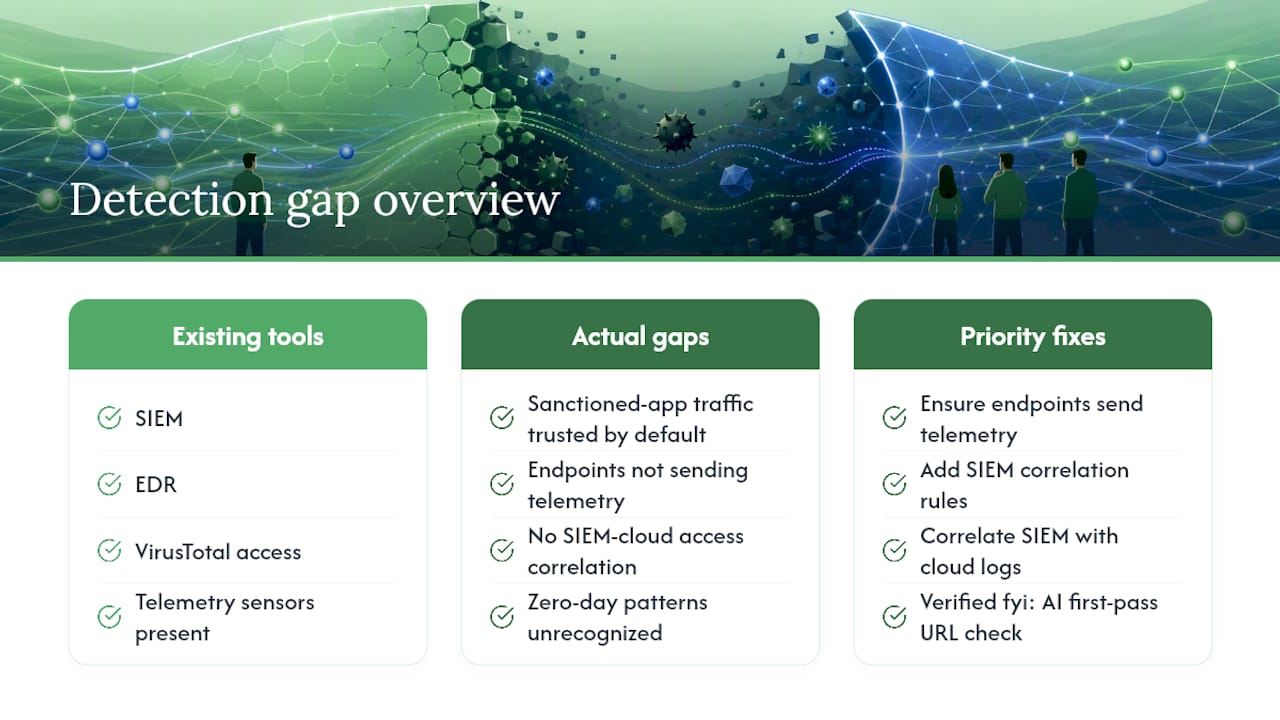
The hardest part of malware hosting detection isn't the tooling. Most organizations already have a SIEM, an EDR, and access to VirusTotal. The gap is in treating sanctioned-app traffic as inherently trustworthy. When a file comes from OneDrive or a GitHub release page, it tends to pass through inspection layers that would catch the same file arriving from an unknown domain.
The MDPI Algorithms review of cloud-assisted detection architectures makes clear that modern systems depend on telemetry aggregation across thousands of endpoints to recognize zero-day patterns. That only works if your endpoints are actually sending telemetry, and if your SIEM is correlating it against cloud access logs. Many organizations have the sensors but not the correlation rules. That's the gap worth closing first, before investing in additional tooling.
Verified fyi's role in this picture is practical and immediate: it gives individuals and security teams a fast, AI-powered first-pass check on any suspicious URL, pulling from the same data sources (Google Safe Browsing, VirusTotal, WHOIS) that enterprise tools use, without requiring enterprise-level setup.
Verified fyi gives you an instant safety check on any suspicious URL
When you encounter a link that looks off, whether it's in an email, a Slack message, or a search result, the fastest first step is an instant trust score check on Verified fyi. The platform analyzes over 200 security and reputation signals, including Google Safe Browsing status, VirusTotal data, WHOIS ownership records, and infrastructure history, and returns a score from 0 to 100 with a clear verdict: dangerous, suspicious, caution, mostly safe, or trusted.

It's free, takes seconds, and requires no account. Paste the URL, read the verdict, and decide whether to proceed or escalate to deeper analysis. For security teams, it works as a lightweight triage layer before committing sandbox resources. For individuals, it's the simplest way to avoid downloading something you'll regret. Check any URL now at Verified fyi.
Sources
- What is Malware Hosting? | CrowdStrike
- Malware Detection with AI: A Comprehensive Review of Trends and Challenges with Future Directions | Peer-to-Peer Networking and Applications | Springer Nature Link
- Algorithms (MDPI) — review of antivirus architecture and cloud-assisted detection
- What Is Malware Hosting? Cloud Abuse Explained | CyberDefenders
FAQ
What is malware hosting detection?
Malware hosting detection is the process of identifying malicious files stored and distributed through hosting infrastructure, including legitimate cloud services, repositories, and compromised servers. It combines file-hash analysis, behavioral monitoring, and URL reputation checks to catch payloads that evade signature-based controls.
Why do attackers use legitimate cloud services to host malware?
Legitimate cloud platforms inherit strong domain reputations, so downloads from services like OneDrive or GitHub rarely trigger domain-blocking filters.
What are the most reliable signs of malware on a hosting environment?
Key signs include unknown or flagged file hashes, high-entropy files, documents spawning script interpreters, and anomalous egress traffic to cloud storage APIs. Two or more of these signals appearing together warrants immediate sandbox analysis.
How does Verified fyi help with detecting malicious hosting?
Verified fyi analyzes over 200 signals, including Google Safe Browsing and VirusTotal data, to produce an instant trust score for any URL. It's a practical first-pass triage tool for identifying suspicious hosts before committing to deeper forensic analysis.
Can a clean VirusTotal result mean a URL is safe?
Not definitively. Public scanners cannot inspect private cloud buckets or detect conditional payloads that only activate under specific system conditions. A clean result reduces risk but doesn't eliminate it; escalate to sandboxing when behavior remains suspicious.