You can usually decide in minutes. Check the HTTPS padlock, run a WHOIS lookup for domain age, and scan the URL with a malware checker. No single check proves a site is safe, but the three together catch most red flags fast. A tool like Verified fyi automates this exact combination if you want an instant verdict instead of running each check yourself.
TL;DR:
- A quick assessment combines checking the HTTPS padlock, WHOIS domain age, and running malware scans to identify most red flags in under a minute.
- Confirming a site's legitimacy requires matching company details, verifying policies, and searching for independent reviews or complaints before making any payment.
- Automated tools like VirusTotal and Google Safe Browsing help detect malware, phishing, or suspicious infrastructures that manual checks might miss.
- Red flags such as recent domains, pushy payment requests, fake legal pages, or inconsistent branding should prompt immediate escalation or rejection.
- Using an integrated trust score tool streamlines the process, offering a reliable, fast verdict based on over 200 signals, ideal for quick vendor vetting.
Table of Contents
- Why Assessing a Partner Site's Security Actually Matters
- Step-by-Step Quick Checklist You Can Run in Under 5 Minutes
- Fast Technical Scans and Tools: What to Run and How to Read the Results
- Red Flags That Should Make You Stop and Escalate
- If Something Looks Risky: How to Verify Deeper, Preserve Evidence, and Report
- Checking Security Headers and Site Configuration
- Assessing Encryption and Data Protection Beyond the Padlock
- Spotting Copycat and Fraud Sites Through Content Clues
- A Concise, Prioritized Routine for When You're Short on Time
- Expert Perspective: Why Quick Checks Work, and Where They Fall Short
- Use Verified Fyi to Consolidate Every Check Into One Score
- Authoritative Tools and Guides to Bookmark
- Sources
- FAQ
Why Assessing a Partner Site's Security Actually Matters
Trusting the wrong vendor site costs more than a bad transaction. It can mean leaked payment details, a phishing page dressed up as a supplier portal, or a "partner" that vanishes after your deposit clears. Shoppers and small business owners face this constantly: a new supplier reaches out, a marketplace lists an unfamiliar seller, or a freelancer gets asked to log into a client's "vendor portal" before starting work.
The good news is that you don't need a security background to catch most scams; you can apply proven strategies for business success to build and demonstrate trust online effectively. You need a short, repeatable routine that checks the things scammers can't easily fake: domain history, verifiable identity, and independent reputation. That's the core of any solid B2B partner security audit, whether you're doing it by hand or letting software do the heavy lifting.
Step-by-Step Quick Checklist You Can Run in Under 5 Minutes
Run these five checks in order. Each one takes under a minute, and together they cover identity, technical hygiene, and reputation.
- Open the site safely and check the padlock. Click the small lock icon in your browser's address bar. It should show a valid certificate with an issuer name and an expiration date that hasn't passed.
- Run a WHOIS lookup. A domain registered last month, with a privacy shield hiding the registrant, is not automatically a scam, but paired with other red flags it's a strong signal to slow down.
- Find the About and Contact pages. Compare the company name, address, and phone number against what shows up in a plain web search. If the details don't match across sources, that's worth investigating.
- Check for privacy policy, terms, and refund details. Legitimate e-commerce and B2B partners publish these pages and keep them current, not copied from another site with the names swapped.
- Search the domain plus "scam" or "complaint." Independent review platforms and forum threads surface patterns that a polished homepage will never admit to.
Pro Tip: Keep a simple spreadsheet of every partner site you vet, with the date checked and what you found. Six months from now, you'll thank yourself when a "new" vendor turns out to be one you already flagged.
This is the fastest way to evaluate B2B site security without any technical tools beyond your browser and a search bar.
Fast Technical Scans and Tools: What to Run and How to Read the Results
Once the manual checklist looks clean, run a couple of automated scans to confirm what your eyes might miss.
- Google Safe Browsing flags sites currently identified as hosting malware or phishing content. It's free, instant, and worth checking before you click any unfamiliar link.
- VirusTotal runs a URL through dozens of scanning engines at once, giving you a consensus view instead of relying on a single vendor's opinion.
- Bitdefender's Link Checker aggregates multiple engines too, and it's a quick second opinion if VirusTotal comes back ambiguous.
- WHOIS/DNS lookups reveal domain age, name servers, and registrar patterns. Dozens of unrelated-looking domains sitting on the same obscure registrar and same creation date often point to bulk-registered scam infrastructure.
- Link expanders unshorten bit.ly or similar links so you can see the real destination before you click, since redirect chains are a common way to hide a malicious final URL.
Here's the catch: SSL alone is not proof of legitimacy. A large share of phishing pages now run valid HTTPS certificates, according to ExpressVPN's security guidance, because certificates are cheap and easy to obtain. Treat the padlock as a baseline, not a verdict. Combine it with WHOIS data and a multi-engine scan before you decide anything meaningful rests on that site's safety.
Red Flags That Should Make You Stop and Escalate
Some signals are decisive enough to end the conversation on the spot. If you see any of these, stop the transaction and dig deeper before proceeding:
- Unusual payment pressure. Requests for wire transfers, gift cards, or cryptocurrency, especially paired with urgency ("pay within the hour or lose the deal"), are classic pressure tactics.
- Missing or copied legal pages. A privacy policy that mentions a different company name, or terms and conditions lifted word-for-word from another business, means someone cut corners or is hiding something.
- Non-clickable trust badges. A security seal or accreditation logo should link to the accreditor's verification page. If it's just a static image, Google's own guidance on structured data treats that kind of decorative badge as meaningless, and so should you.
- Excessive data requests. A vendor asking for your Social Security number or full bank details before you've even agreed to terms is asking for more than the transaction requires.
- Conflicting identity across listings. Different addresses on LinkedIn, the website, and a business registry, or negative reports piling up on multiple independent platforms, both point the same direction: walk away.
If Something Looks Risky: How to Verify Deeper, Preserve Evidence, and Report
If the checklist raises doubts but doesn't confirm a scam outright, dig one layer further before you commit.
- Document everything. Screenshot the site, save the WHOIS record, and note the exact URL and date. If the site disappears later, you'll have proof it existed and what it claimed.
- Cross-check public records. Search business filings, LinkedIn profiles for named employees, and any third-party press mentions. A company with zero footprint outside its own website is a red flag.
- Test small before you go big. A small, reversible payment can validate a legitimate new vendor. Refuse outright if they push back on any payment method except one that's hard to trace.
- Report what you find. File a status report with Google Safe Browsing if the site is actively malicious, and escalate to the FTC or IC3 for suspected fraud. Dispute the charge with your card issuer if money already changed hands.
Pro Tip: Save your findings even if the site turns out to be legitimate. A clean audit trail on a trusted partner saves you from re-checking the same site every time you work with them again.
Checking Security Headers and Site Configuration
A quick look under the hood can confirm whether a site's operators actually invest in security, or whether the padlock is the only thing holding the place together.
Browser developer tools (right-click, "Inspect," then the Network tab) show you the HTTP response headers a site sends back. Two worth checking:
- Content Security Policy (CSP): This header tells the browser which sources are allowed to load scripts, images, and other content. Its presence suggests the site's developers actively defend against injected malicious code.
- X-Frame-Options: This header prevents the site from being loaded inside a hidden frame on another page, a common trick used in clickjacking attacks.
You don't need to understand every line of these headers. Free header-scanning sites let you paste a URL and get a plain readout of what's present and missing. A site with none of these headers isn't automatically dangerous. Plenty of small, legitimate businesses skip advanced configuration. But combined with other red flags, missing headers add weight to the case for caution, and their presence is a genuine signal that whoever built the site took security seriously rather than bolting on a certificate and calling it done.
Assessing Encryption and Data Protection Beyond the Padlock
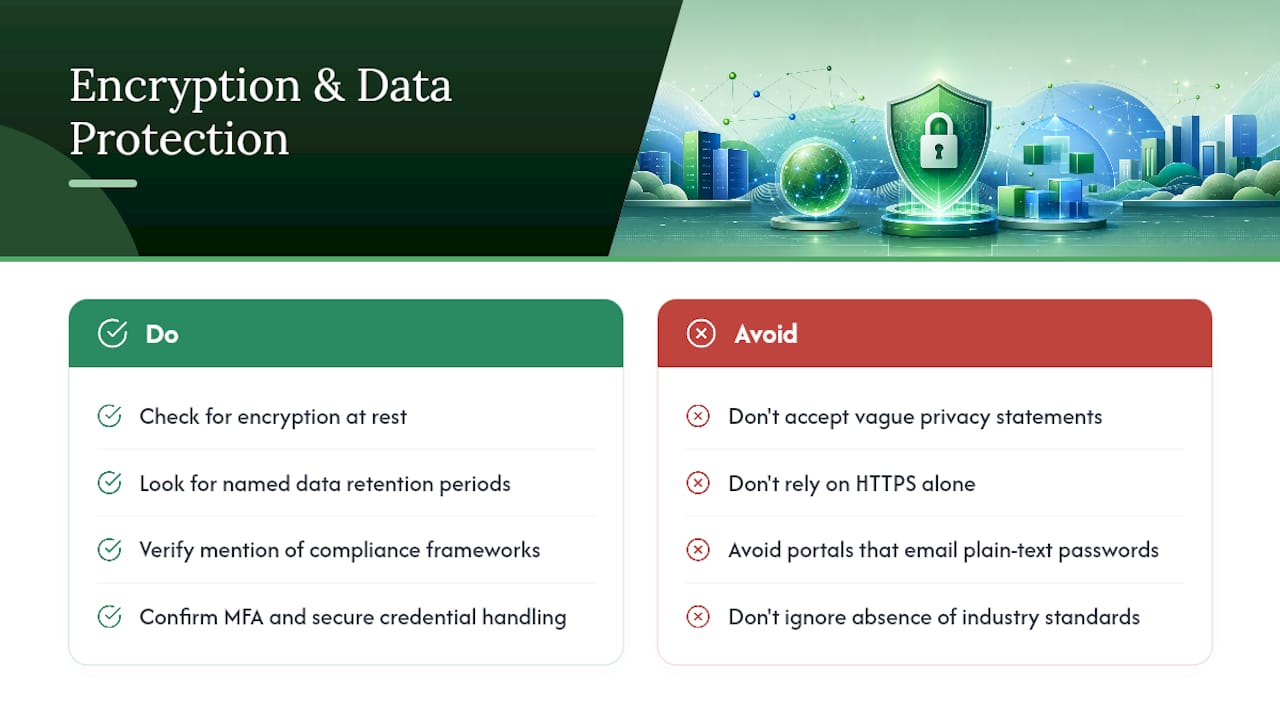
HTTPS encrypts data in transit, the trip between your browser and the site's server. It says nothing about how that data is stored once it arrives, and that's where a lot of B2B guest access security actually breaks down.
Look for specific language, not vague reassurance. A privacy policy that names actual practices, encryption at rest, data retention periods, third-party processors, reads very differently from one that says only "we take your privacy seriously." The vague version is often a placeholder nobody bothered to customize.
Check whether the site mentions compliance frameworks relevant to its industry, such as PCI DSS for anyone processing card payments. You're not expected to audit their compliance yourself. You're checking whether they mention it at all, since a site handling sensitive data with zero reference to any standard is worth a second look.
Also check how they handle account credentials. A partner portal that emails you a plain-text password instead of letting you set one, or that has no multi-factor authentication option at all, is behind current norms for anyone serious about protecting client data. These are quick observations, not deep technical audits, but they separate a business that has thought about data protection from one that's only thought about appearances.
Spotting Copycat and Fraud Sites Through Content Clues
Fraud sites increasingly copy real companies down to the logo and color palette. What they usually can't copy well is voice.
Read a paragraph or two of the About page out loud. Genuine company writing has a consistent tone, a real name attached to leadership, and specific details about how the business actually operates. Copycat sites often have stilted, translated-sounding prose, generic stock photography with no captions, or a founder bio that reads like it was written about no one in particular.
Check branding consistency across pages. A logo that's slightly different resolution or color on the homepage versus the checkout page suggests someone lifted assets from the real company's site without matching everything perfectly. Compare the domain to the brand name it claims: a company called "Meridian Supply Co." operating from meridiansupplyco-shop.net instead of its known main domain is a mismatch worth investigating immediately.
Cross-reference specific claims. If the site cites an award, a certification, or a partnership, search for that claim independently. Real accolades usually show up in press coverage or the accrediting body's own directory. Invented ones show up nowhere except the site claiming them.
A Concise, Prioritized Routine for When You're Short on Time
When you have five minutes and need an answer, run checks in this order, stopping the moment something fails decisively:
First, check the padlock and certificate. Second, run a WHOIS lookup for domain age and registrant visibility. Third, run a multi-engine URL scan through VirusTotal or a comparable checker. Fourth, search the company name plus "review" or "complaint" and scan what comes up. Fifth, if everything still looks reasonable, skim the About and Contact pages for consistency with what you just found.
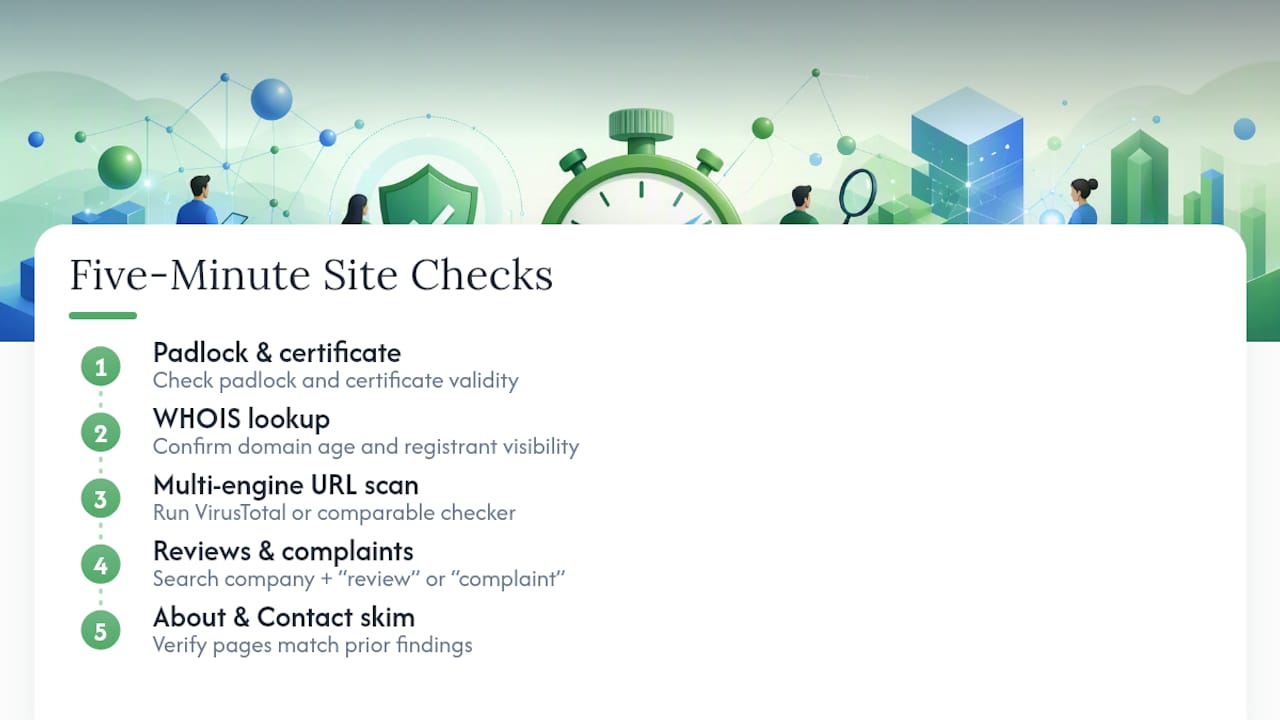
That's the entire partner site vulnerability assessment in five moves. Any one check failing outright, an expired certificate, a domain registered last week, a wave of scam complaints, is reason enough to stop and dig deeper using the escalation steps above. If all five come back clean, you've done a legitimate assessment in less time than it takes to read a product review.
Expert Perspective: Why Quick Checks Work, and Where They Fall Short
The strongest trust signals combine entity identity, third-party evidence, and technical soundness, and Formative Digital's analysis of what actually moves the needle backs that up. No scanner catches everything; ExpressVPN's own guidance treats these tools as a first filter, not a final answer. That's why consistency across sources matters more than any single green checkmark.
My practical advice: bookmark the partner sites you've already vetted and trust, and re-run your checklist on active partners every few months. Domains change hands. Companies get acquired. A site safe today isn't guaranteed safe next quarter.
— Nick
Use Verified Fyi to Consolidate Every Check Into One Score
Running five separate checks by hand works, but it takes time you may not have before every new vendor conversation. Verified fyi built its free website trust checker to run that entire routine automatically: it cross-references over 200 security, ownership, reputation, and compliance signals, including WHOIS data, Google Safe Browsing status, and public review patterns, then returns a 0 to 100 trust score with a plain-language verdict.

The workflow matches everything covered above. Paste the URL, get your score in seconds, and read the categorized verdict, from "trusted" down to "dangerous," along with the specific signals driving that result. You can browse recently checked sites to see real examples of how borderline cases get scored, and if you run a site yourself and want to show visitors you've been independently checked, look into the trust badge option. Since the checker itself is free with no signup required, there's no reason not to paste your next unfamiliar partner URL in before you send that first payment.
Authoritative Tools and Guides to Bookmark
- Google Safe Browsing: check current malware and phishing status for any URL.
- VirusTotal: multi-engine scan for a fast consensus verdict.
- WHOIS lookup: domain age, registrant, and registrar history.
Sources
- Google Safe Browsing
- How to check if a website is safe to visit | ExpressVPN
- Trust signals for your website | Formative Digital
- Bitdefender Link Checker
FAQ
How do I assess B2B partner site security quickly?
Run three checks first: the HTTPS padlock and certificate, a WHOIS lookup for domain age, and a multi-engine URL scan like VirusTotal or Google Safe Browsing. If all three look clean, move to identity checks like matching contact details and independent reviews before you commit to anything financial.
Is a padlock icon enough to trust a website?
No. HTTPS encrypts the connection, but many phishing sites now use valid SSL certificates too, since certificates are cheap and easy to obtain. Treat the padlock as one signal among several, not proof of legitimacy on its own.
What does a new domain registration date tell me?
A domain registered days or weeks ago, especially with a privacy shield hiding the registrant, is a common pattern among scam sites built for short-term campaigns. It's not conclusive by itself, but combined with other red flags it's a strong reason to slow down.
Does Verified fyi cost anything to use?
Verified fyi's core website trust checker is free, with no signup required. You paste a URL and get an instant 0 to 100 trust score along with a categorized verdict explaining the result.
What should I do if a partner site fails my checks?
Stop the transaction, document what you found with screenshots and saved WHOIS data, and avoid any payment method they're pushing if it seems unusually urgent or untraceable. Report actively malicious sites to Google Safe Browsing and escalate suspected fraud to the FTC or IC3.