Phishing is a scam that tricks people into revealing passwords, financial details, or authorizing access to their accounts, usually by posing as a trusted contact or company. It remains a leading cause of identity theft and account takeover, and it's getting harder to catch: the APWG recorded a 10.1% rise in phishing activity in Q2 2026, with 425,808 attacks logged in June alone. A quick check with a site verifier, combined with a few habits covered below, closes most of the gap attackers rely on.
TL;DR:
- Attackers now use diversified methods, including paid ads, social media posts, compromised accounts, and search engine manipulation, expanding beyond email.
- Advanced tactics like device-code phishing and adversary-in-the-middle attacks can bypass multi-factor authentication by capturing valid session tokens.
- To avoid falling victim, always verify sender addresses, hover over links, treat urgent requests skeptically, and use site verifiers before clicking suspicious links.
- Promptly reporting and securing accounts after an incident, switching to phishing-resistant MFA, using password managers, and tested backups significantly strengthen long-term protection.
Table of Contents
- What Are the Main Types of Phishing Attacks?
- How Do Modern Phishing Attacks Actually Work?
- How Can You Tell If a Message Is Phishing?
- What Should You Do If You Think You Were Phished?
- What's the Best Way to Protect Yourself From Phishing Long Term?
- Where Should You Report a Phishing Attempt?
- How Do You Check a Suspicious Link Safely?
- Why Phishing Works: The Psychology Behind the Scam
- What Can Real Phishing Incidents Teach Us?
- What Are the Legal Consequences of Phishing?
- Combining Habits With Technical Defenses
- Check Before You Click: A Free Way to Vet Suspicious Sites
- Sources
- FAQ
What Are the Main Types of Phishing Attacks?
Phishing isn't one scam. It's a family of tactics that all lean on the same trick: impersonate someone you trust, then ask for something you'd never hand over if you stopped to think. Recognizing which flavor you're looking at helps you react correctly instead of freezing or overreacting.
Email phishing is the original and still the most common form. You get a message that looks like it's from your bank, your employer's IT department, or a shipping company, asking you to "verify" an account or "confirm" a delivery. The link goes to a page built to steal your login.
Spear phishing narrows the target. Instead of blasting thousands of generic emails, the attacker researches one person, maybe a finance employee, and crafts a message referencing a real vendor, a real invoice number, or a real coworker's name. It's phishing vs. spear phishing in a nutshell: broad net versus surgical strike, and spear phishing succeeds more often because it feels personal.
Smishing is phishing delivered by text message. A message claims your package couldn't be delivered, or your bank flagged suspicious activity, with a short link to tap. This channel is exploding: the APWG found smishing volume jumped 40% between Q1 and Q2 2026, a faster growth rate than almost any other phishing method tracked.
Vishing is the voice call version, often a robocall or a live scammer claiming to be from the IRS, Social Security, or your bank's fraud department. Vishing increased noticeably in the same quarter, according to APWG data, and it's especially effective against older adults who trust a human voice more than an email.
Quishing uses QR codes instead of links, printed on fake parking tickets, taped over real codes on restaurant menus, or embedded in emails as an image (since many spam filters can't scan text inside a QR code). Scanning takes you to a lookalike site before you've had a chance to check the URL.
Page hijacking compromises a legitimate, previously trustworthy website and quietly injects phishing content or redirects, so the link itself looks completely clean.
A few things worth knowing about where these attacks now show up:
- Attackers increasingly buy paid ads and boost social media posts to push fake login pages, exploiting ad platforms' reach rather than relying only on email inboxes.
- Compromised accounts belonging to real friends or coworkers get used to send phishing links, which is why a message "from" someone you know still deserves scrutiny.
- Search engine results are being gamed with fake customer service numbers and fraudulent download pages, so a top search result isn't automatically safe.
The APWG's Q2 2026 trends report specifically flags this diversification: phishing is no longer an inbox problem. It's a problem that follows you across text messages, phone calls, social feeds, and paid search results, wherever attackers can buy or fake their way into your attention.
How Do Modern Phishing Attacks Actually Work?
Every phishing attack layers a psychological trick over a technical one. The psychology does the heavy lifting: urgency ("your account will be locked in 24 hours"), authority ("this is the IRS"), and reward ("you've won a gift card") all short-circuit the pause where you'd normally think twice. Microsoft's guidance on phishing points out that these levers are deliberate design choices, not accidents, built to get you moving before your skepticism kicks in.
The technical layer is where things get more sophisticated than most people expect. A few patterns show up constantly:
- Lookalike domains that substitute a zero for an "o" or add an extra letter (paypa1.com, arnazon.com).
- Subdomain stuffing, where attackers register a domain like company-name.something.com to make the URL look legitimate at a glance, a trick that also lets them rotate infrastructure quickly when one domain gets blocked, according to Microsoft's security research.
- Link obfuscation using URL shorteners or redirect chains so the final destination is hidden until you click.
- Malicious ads that mimic real company branding closely enough to pass casual inspection.
The newest and most concerning trend is what security researchers call device-code phishing and adversary-in-the-middle (AiTM) attacks. Here's the mechanism, and why it matters even if you already use multi-factor authentication: instead of stealing your password, the attacker tricks you into entering a legitimate-looking code on the real login page, or approving a device sign-in request that actually authorizes their session. The result is that they capture a valid access token, not your password, which means standard MFA methods like a one-time code or push approval can be bypassed entirely, because you unknowingly did the approving yourself.
Microsoft's security blog documented passkey-themed campaigns in 2026 that used exactly this flow, luring users with fake "set up your passkey" prompts to walk them through a device-code authorization that handed attackers full account access. This is the reason security teams now push "phishing-resistant" MFA (more on that shortly) instead of treating any MFA as automatically safe.
Token theft is fundamentally different from password theft. A stolen password can be changed. A stolen session token can let an attacker act as you, reading email, moving files, approving transactions, until the token expires or gets revoked, sometimes without ever triggering a password reset prompt that would tip you off.
How Can You Tell If a Message Is Phishing?
The fastest way to catch phishing is to know which details attackers routinely get wrong, and to slow down just long enough to check them.
- Check the sender address, not just the display name. A message can show "Wells Fargo Security" while the actual email address is a string of random characters at a free email domain. Tap or hover on the sender name to reveal the real address.
- Look for domain mismatches. If a link's destination doesn't match the company it claims to be from, that's disqualifying on its own. Hover over any link before clicking, or on mobile, press and hold to preview the URL.
- Treat urgency and threats as a red flag, not a reason to hurry. "Your account will be suspended in 24 hours" is a manufactured deadline designed to prevent verification.
- Be suspicious of unexpected attachments, especially invoices, shipping labels, or "voicemail" files you weren't expecting.
- Never trust a request for a one-time code, password, or wire transfer that arrives unsolicited, even if it looks like it's from your bank or boss.
- For QR codes, check the physical surface for a sticker placed over a real code, and consider typing the destination manually instead of scanning when the source is a flyer, parking meter, or unsolicited email.
If you want a second opinion before clicking anything, copy the link (without visiting it) and paste it into a site verification tool that checks it against Google Safe Browsing, VirusTotal, and WHOIS registration data. You can also review common warning signs on fake websites to sharpen your eye for the details that don't quite add up.
For phone calls, the same logic applies with a twist: legitimate banks and government agencies will never ask you to read back a verification code you just received, and they won't pressure you to stay on the line while you "verify" something at another number they provide. The FTC's core advice is to hang up and call the organization back using a number you look up independently, never one given to you during the suspicious call or text.
Pro Tip: Save your bank's, employer's, and major service providers' real phone numbers and support pages in your contacts now, before you're under pressure and tempted to trust whatever number appears in a scary text.
What Should You Do If You Think You Were Phished?
Speed matters more than perfection here. Work through these steps in order, and don't skip ahead to "fix everything" before you've secured your accounts.
- Stop interacting immediately. Close the browser tab, don't reply to the text, and don't call any number provided in the suspicious message.
- Document what happened. Screenshot the message, note the time, and save the sender's address or phone number, you'll need this for reports and possibly for your bank's fraud team.
- Change passwords starting with your email and financial accounts, since a compromised email address can be used to reset passwords on everything else you own.
- Enable multi-factor authentication on any account that doesn't already have it, prioritizing email, banking, and cloud storage.
- Run a full scan with reputable security software on the device you used, and update your operating system and browser if updates are pending.
- Check recent account activity on your bank, email, and any account you think was targeted, looking for logins from unfamiliar locations or devices.
- Contact your bank or credit card issuer directly if you entered any financial information, and ask about a fraud alert or card replacement.
- Report the incident to IdentityTheft.gov, which walks you through a personalized recovery plan based on exactly what was compromised.
None of this requires technical expertise. It requires doing the steps in order, without letting embarrassment slow you down. Financial institutions see phishing victims constantly. Reporting quickly is a routine call for them, not an admission that gets you in trouble.
What's the Best Way to Protect Yourself From Phishing Long Term?
The individual defenses you've probably heard about, strong passwords, antivirus software, are still relevant. But no single layer is enough on its own, which is exactly why the FTC recommends a multi-layered approach rather than betting everything on one tool.
Turn on automatic updates everywhere. Operating systems, browsers, and apps regularly patch the exact vulnerabilities phishing pages try to exploit. An out-of-date browser is an open door.
Use multi-factor authentication, but know that not all MFA is equal. A text message code is better than nothing, but it can be intercepted through SIM-swapping or, as covered earlier, approved unknowingly through device-code phishing. Where the option exists, switch to phishing-resistant MFA built on FIDO2 or passkeys, which tie authentication to your specific device and can't be phished the same way a typed code can. Microsoft's own guidance following its 2026 AiTM research specifically recommends this stronger MFA tier along with strict conditional access controls for anyone managing sensitive accounts.
Get a password manager and stop reusing passwords. If one account gets breached, unique passwords keep the damage contained to that single account instead of cascading into your email, banking, and shopping accounts all at once.
Back up important files somewhere separate from your main device, whether that's cloud storage or an external drive, and actually test that the restore works. A backup you've never tested is a guess, not a safety net.
Adjust your email's spam filtering and report phishing attempts through your email provider's "report phishing" button rather than just deleting them, since that feedback helps filters catch similar messages for other users.
Treat ads and sponsored search results with the same skepticism as unsolicited emails. Given how much attackers now lean on paid advertising infrastructure to distribute phishing links, a sponsored result claiming to be your bank's login page deserves a second look before you click.
Here's a compact way to prioritize the changes, roughly in order of impact for the least effort:
- Password manager plus unique passwords on every account
- Phishing-resistant MFA on email, banking, and cloud storage
- Automatic updates turned on everywhere
- Tested backups of anything you couldn't afford to lose
- A habit of checking suspicious links before clicking, using a verification tool or resources like AML Guard's security overview for a deeper look at how account integrity controls work behind the scenes
Pro Tip: If you only make one change this month, switch your email account's second factor from SMS to an authenticator app or passkey. Email is the master key to almost every other account you own, and it deserves your strongest protection.
Where Should You Report a Phishing Attempt?
Reporting phishing does two things: it protects you if you need a paper trail for fraud disputes, and it feeds data into systems that get malicious domains and numbers blocked faster for everyone else.
- Forward suspicious emails to [email protected], which feeds directly into the Anti-Phishing Working Group's tracking database.
- Forward suspicious texts to SPAM (7726), a standard short code most US carriers use to flag smishing.
- File a report with the FTC at ReportFraud.ftc.gov, especially if money or personal information changed hands.
- Start recovery steps at IdentityTheft.gov if you suspect identity theft, which generates a customized action plan.
- Check CISA's guidance if you manage a small business or want to understand indicators of compromise beyond the individual level.
How Do You Check a Suspicious Link Safely?
A site verifier gives you a way to check a link without ever opening it in a browser, which matters because some phishing pages fingerprint visits or trigger downloads on load.
Some tools cross-reference a URL against Google Safe Browsing's blocklists, VirusTotal's malware scanning engines, WHOIS registration records, and broader reputation data, then compile it into a single trust score with a plain-language verdict. Here's the process: paste the URL, review the score, read the breakdown of what pulled the score down (a domain registered last week, no SSL certificate, matches on a known scam blocklist), then decide whether to proceed, avoid the site, or report it.
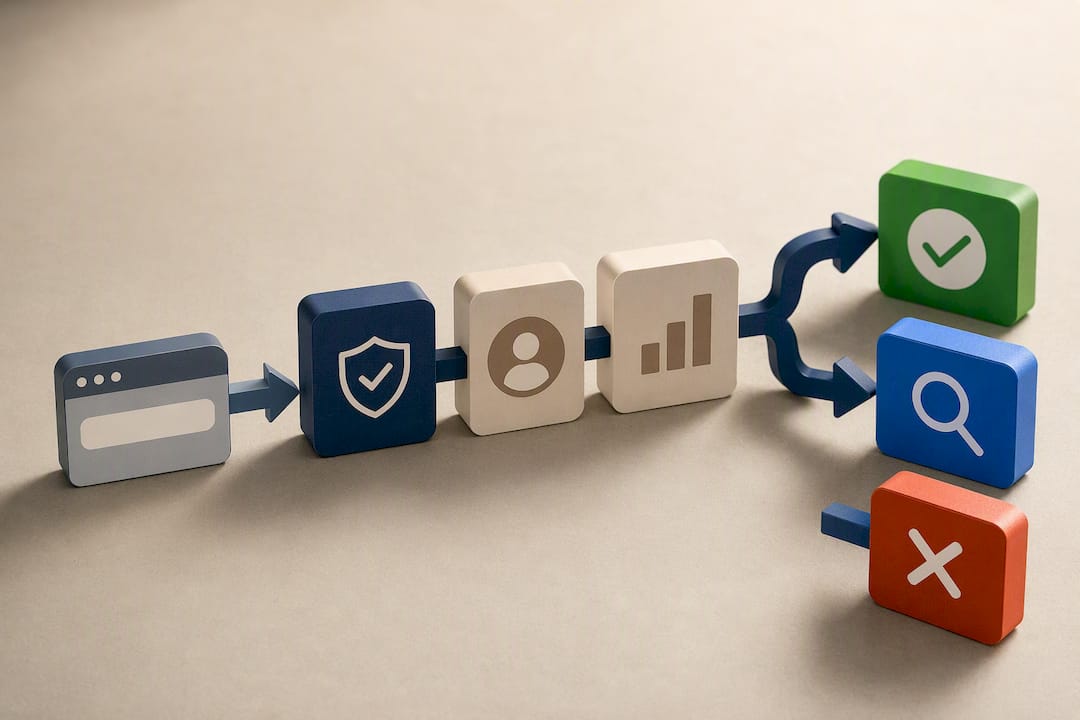
A verifier is a triage tool, not a cure. It won't clean an infected device, undo a fraudulent charge, or recover a stolen password, and a brand-new legitimate site can occasionally score lower simply because it hasn't built up reputation yet. Use it alongside the manual checks covered earlier: a low score is a hard stop, a middling score means dig further using signs of an unsafe website as a checklist, and a high score still doesn't excuse handing over a one-time code to someone who called you first.
Why Phishing Works: The Psychology Behind the Scam
Phishing doesn't succeed because victims are careless. It succeeds because attackers deliberately engineer messages to exploit normal human responses: fear of consequences, deference to authority, and the instinct to help a friend in need. A message claiming your account will be suspended activates the same stress response as any real threat, and stress narrows attention exactly when you need it broadened.
Shame compounds the damage after the fact. Many victims describe hesitating to report what happened because they feel foolish, which delays the password changes and fraud alerts that actually limit harm. That delay is itself part of what attackers count on.
Microsoft's research on phishing psychology notes that even messages appearing to come from real, known contacts can be dangerous, since a friend's or coworker's compromised account will send convincing requests that bypass your usual skepticism toward strangers. Recognizing that anyone, including people you trust completely, can become an unwitting delivery vehicle for phishing is part of building resilience against it. The goal isn't paranoia. It's building a habit of pausing on unusual requests regardless of who appears to be sending them.
What Can Real Phishing Incidents Teach Us?
Large-scale phishing incidents follow a recognizable pattern: a single successful click, often from one employee or user, cascades into far larger consequences than the initial message suggested. Attackers rarely need to breach a system directly when a well-crafted email or text can get someone to hand over the keys voluntarily.
The device-code and AiTM campaigns documented by Microsoft's security team in 2026 illustrate this well. Attackers used passkey-themed lures to walk targets through what looked like a routine security upgrade, and the resulting token theft gave them access to cloud data and identity systems without ever needing a stolen password. The consequences extended well past the individual who clicked: compromised accounts became launch points for further attacks against contacts, vendors, and connected systems.
The consistent lesson across these incidents is that the initial cost, a few minutes of a distracted employee's attention or a moment of panic over a fake overdue bill, rarely matches the downstream cost. Recovery from identity theft or account compromise can stretch across weeks of password resets, fraud disputes, and credit monitoring, all traceable back to one message that looked routine enough to trust.
What Are the Legal Consequences of Phishing?
Phishing is prosecuted in the United States primarily under federal wire fraud and computer fraud statutes, along with identity theft laws that apply once stolen credentials are used to access accounts or financial systems. Penalties scale with the scope of the operation: individual phishing schemes can carry years of federal prison time, and organized operations that cross state or national lines routinely draw multi-year sentences plus restitution orders when courts can quantify victim losses.
Beyond criminal prosecution, businesses that fail to protect customer data used in phishing-adjacent breaches can face regulatory penalties under frameworks like the FTC Act's unfair-or-deceptive-practices authority, which the FTC has used to pursue companies with inadequate security practices. State-level data breach notification laws add another layer, requiring companies to disclose incidents that expose personal information within specific timeframes.
For individual victims, the legal system's protections mostly work in your favor after the fact: banks are generally required to investigate and often reverse unauthorized transactions reported promptly, and IdentityTheft.gov provides the documentation trail needed to dispute fraudulent accounts opened in your name. Prosecution of the attackers themselves is far less certain, since many operations run from jurisdictions outside US law enforcement's direct reach, which is precisely why prevention and fast reporting matter more than counting on legal recourse after the fact.
Combining Habits With Technical Defenses
Phishing tactics shift every year, smishing and vishing weren't the dominant channels they are now even a couple of years ago, which means the habits that protected you in the past need periodic refreshing, not a one-time lesson you can file away.
Tools genuinely help. Password managers, phishing-resistant MFA, and site verifiers all reduce the odds that a single moment of distraction turns into a compromised account. But none of them replace a healthy dose of skepticism toward unexpected requests, especially ones that create urgency or arrive through a channel you didn't initiate. The strongest security posture pairs both: a technical safety net underneath, and a habit of pausing before you click sitting on top of it. Neither one alone catches everything the other misses.
— Nick
Check Before You Click: A Free Way to Vet Suspicious Sites
Some site verifiers provide an evidence-based safety signal in seconds, cross-referencing over 200 security and reputation checks so you don't have to manually dig through WHOIS records or malware databases yourself before deciding whether a link is safe.

If a text, email, or ad sends you to an unfamiliar site, paste the URL into the free website trust checker before entering any information. You'll get a 0 to 100 score along with a plain breakdown of what's driving that score, a new domain registration, a missing security certificate, a match against known scam patterns, so you can decide whether to proceed or walk away. If you run your own site and want to reassure visitors that you've been independently checked, the trust badge displays your verification status directly on your pages. Either way, the next time a link looks even slightly off, run it through the checker first. It takes less time than reading this sentence twice.
Sources
For deeper detail beyond this guide, the APWG's Q2 2026 trends report breaks down delivery-channel shifts and quarterly attack volume. The FTC's consumer guidance covers recognition and recovery in plain language, while Microsoft's security blog documents the technical mechanics of passkey-themed and AiTM attacks. IdentityTheft.gov remains the fastest route to a personalized recovery checklist if you've already been targeted.
- APWG Phishing Activity Trends Report, Q2 2026
- How to recognize and avoid phishing scams (FTC)
- Passkey-themed social engineering leads to identity and cloud compromise (Microsoft Security Blog)
FAQ
What Does Phishing Mean?
Phishing is a scam where attackers impersonate a trusted person or organization, through email, text, phone, or a fake website, to trick you into revealing passwords, financial details, or granting account access.
How Do I Know If I've Been Phished?
Warning signs include unrecognized logins or password reset emails you didn't request, unfamiliar charges on your accounts, or contacts mentioning strange messages sent from your email or social accounts. If you clicked a suspicious link or entered credentials on an unfamiliar page, treat it as a likely compromise and start the recovery steps immediately.
What Happens If I Delete a Phishing Email Instead of Reporting It?
Deleting the email removes it from your inbox but does nothing to stop the same message from reaching other people, and it gives you no record if you later need to dispute related fraud. Forwarding it to [email protected] first, or using your email provider's "report phishing" button, takes only a few extra seconds and helps flag the sender for others.
What Are the Four Main Types of Phishing?
The most commonly cited categories are email phishing, spear phishing (targeted at a specific individual), smishing (SMS text messages), and vishing (voice calls), though quishing (QR codes) has grown common enough that many guides now count it as a fifth major category.
Can a Site Verification Tool Catch Every Phishing Site?
No tool catches everything, since attackers register new lookalike domains constantly, but a verifier like Verified fyi checks a URL against Google Safe Browsing, VirusTotal, and WHOIS data in seconds, which flags most newly registered or blocklisted phishing pages before you enter any information.