Quick check: if Google Safe Browsing and a multi-engine scan both come back clean, and the site's WHOIS and SSL details line up with who it claims to be, it's likely safe to proceed. If any of those checks throw a flag, or the picture looks inconsistent, treat the site as suspicious and hold off on entering payment details until you dig deeper.
TL;DR:
- Running quick checks like Google Safe Browsing and VirusTotal can catch most obvious scams before deeper investigation.
- Manually verifying URL authenticity, SSL details, and reviewing contact pages provides insight that automated tools cannot offer.
- Sites with suspicious flags should prompt immediate action, including halting payment, changing passwords, and reporting the site.
- Authentic businesses typically have older domains, a well-designed mobile experience, and genuine review patterns, unlike scam sites.
- Automated trust scores from tools like Verified FYI offer fast, reliable initial assessments but should be complemented by manual verification for high-stakes transactions.
Table of Contents
- Quick Checklist: 7 Non-Technical Checks You Can Run in 5 Minutes
- How Do Automated Website Scanners Actually Work?
- What Should You Check Manually Beyond the Scanners?
- What to Do If a Site Looks Suspicious
- Is the Content on the Site Actually Original?
- Can Browser Developer Tools Help You Spot a Fake Site?
- Does Mobile Responsiveness Say Anything About Trust?
- What Design and Navigation Red Flags Signal Fraud?
- Publisher Perspective: How Verified Fyi Approaches Website Validation
- Try Verified Fyi's Free Website Trust Checker
- Sources
- FAQ
Quick Checklist: 7 Non-Technical Checks You Can Run in 5 Minutes
You don't need a computer science degree to validate a website. You need five minutes and a habit of checking before you click "buy" or "submit." Here's the order that catches the most problems with the least effort:
- Read the URL slowly. Scammers rely on you skimming. Look for extra characters, swapped letters, or odd subdomains like "amazon.security-update.net" instead of amazon.com.
- Run a Google Safe Browsing check. The Site Status tool tells you instantly if the URL is flagged for malware, phishing, or unwanted software. Google's system protects billions of devices daily, so its blocklist data is deep.
- Paste the URL into VirusTotal. It scans the link against dozens of security engines at once and shows you how many flagged it.
- Check for HTTPS and glance at the certificate. Click the padlock icon and look at who the certificate was issued to.
- Look up the domain's age with a WHOIS lookup. A site claiming to be an established retailer that was registered three weeks ago is a problem.
- Search "[site name] reviews" or "[site name] scam" on a separate tab, not just on the site itself.
- Check for a real contact page, return policy, and privacy policy. Then notice if the site is rushing you with countdown timers or "only 2 left in stock" banners.
Pro Tip: Do the URL check and the Safe Browsing check first. They take ten seconds combined and catch the majority of obvious scams before you waste time on anything else.
None of these steps require technical skill. They require slowing down for five minutes, which is usually exactly what a scam site is counting on you not to do.
How Do Automated Website Scanners Actually Work?
Automated tools give you speed, but they don't give you certainty. Understanding what each one actually checks helps you read the results correctly instead of assuming a clean scan means a safe site.
- Google Safe Browsing maintains a list of known malware, phishing, and deceptive-software URLs and lets anyone check a site's status for free. It's reactive: a site has to have already been reported or detected before it shows up as unsafe.
- VirusTotal aggregates results from more than 70 antivirus and security engines at once, showing you a count like "2/91 flagged" rather than a single verdict.
- Reputation and blocklist lookups reveal whether a domain shares infrastructure with known bad actors, even if the specific URL hasn't been flagged yet.
A 0/90 result on VirusTotal is a strong positive signal, not a guarantee. Brand-new phishing pages can slip past every engine for hours or days simply because no one has reported them yet. That gap between "not yet flagged" and "actually safe" is where a lot of damage happens, which is why pairing an automated scan with a reputation check and a manual look at the site itself gives you a far more reliable read than any single tool alone.
What Should You Check Manually Beyond the Scanners?
Automated scans catch known threats. Manual checks catch the subtler stuff, the details a scanner has no way to weigh.
- Parse the URL for lookalikes. Watch for extra words jammed into a subdomain, a hyphen replacing a space in a brand name, or a ".shop" or ".store" ending standing in for a familiar ".com".
- Open the SSL certificate and check the "Issued to" field. A legitimate business site often shows an organization name; a free certificate with no organization detail isn't damning on its own, but it removes one point of reassurance. HTTPS is baseline hygiene at this point, not proof of legitimacy, since attackers get free certificates too.
- Read the "Contact Us" and "About" pages closely. A real business usually lists a physical address, a working phone number, and a named entity, not just a contact form.
- Cross-check reviews across sources, not just the testimonials on the site itself. Look for reviews that all appeared within the same short window, using near-identical phrasing, which is a classic sign of manufactured praise.
Pro Tip: Polished design and clean copy don't mean much anymore. AI tools can generate a professional-looking storefront in an afternoon, so lean on the technical and ownership details, not how the site looks.
Even a site checker like Verified fyi that weighs 200-plus reputation signals can't replace a two-minute read of the "About" page. It speeds up the technical side; you still bring the judgment.
What to Do If a Site Looks Suspicious
If two or more checks raise a flag, stop and follow these steps in order rather than talking yourself into "it's probably fine":
- Close the tab without entering any payment or login information, and take a screenshot for your records.
- Run a quick scan with your device's antivirus software, especially if you already clicked a link or downloaded a file.
- Change any passwords you may have reused on that site, particularly your email password.
- Report the URL through Google Safe Browsing or your browser's built-in "report unsafe site" option, and file a complaint with the FTC if money changed hands.
- If you already paid, contact your bank or card issuer immediately. Credit cards and services like PayPal offer dispute protections that bank transfers generally don't.
Document everything: screenshots, emails, order confirmations. Most card issuers give you a window of 60 to 120 days to dispute a charge, but the process moves faster the sooner you file.
Is the Content on the Site Actually Original?
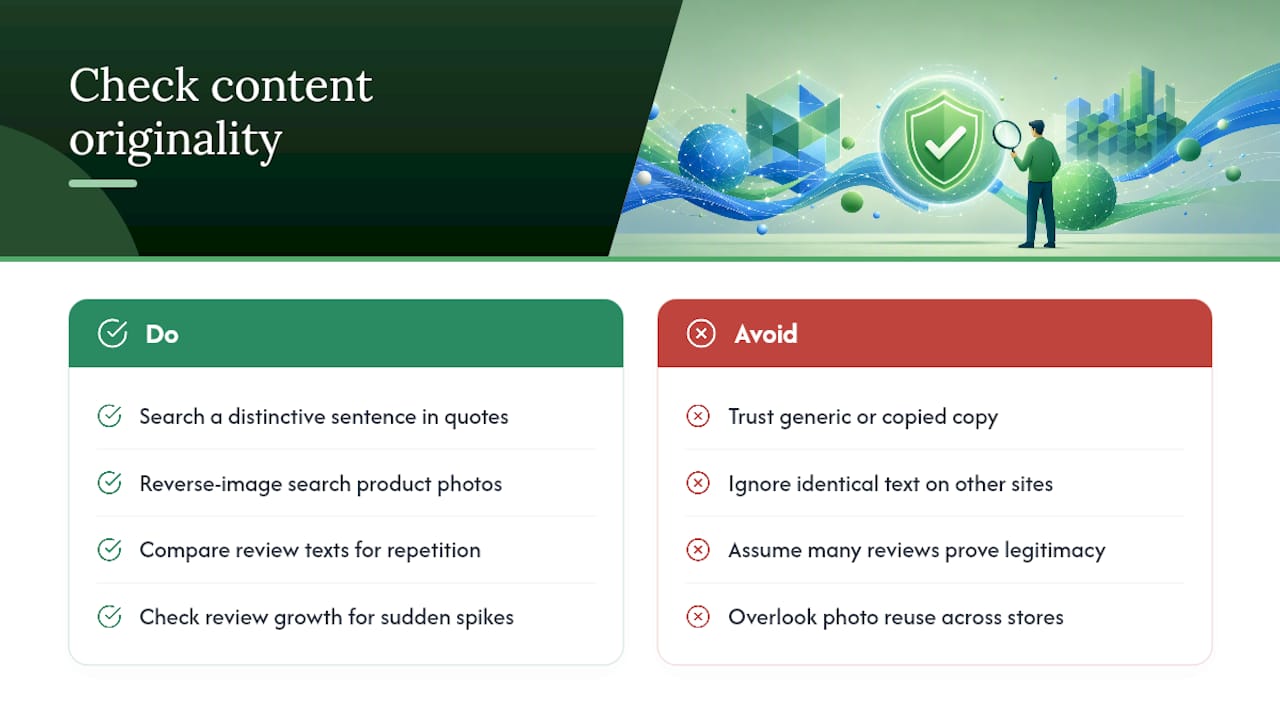
Copied or fabricated content is one of the easiest scam signals to check and one of the most overlooked. Fraudulent sites frequently lift product descriptions, "About Us" text, and even entire blog posts from legitimate businesses because writing original copy takes time scammers don't want to spend.
Take a distinctive sentence from the site, something specific rather than generic, and paste it into a search engine in quotation marks. If identical text shows up on three other unrelated domains, you're looking at a template scam operation, not a real business. The same applies to product photos: a reverse image search often reveals the same picture attached to a dozen different store names and price points.
Fake reviews follow a similar pattern. Watch for review text that reads suspiciously similar across "different" customers, or a rating that jumped from a handful of reviews to hundreds within a matter of weeks. Genuine review growth tends to be gradual and uneven, matching real purchase patterns rather than a sudden spike timed to a launch.
This check matters most for sites selling physical goods or claiming professional credentials, since those are the categories where copied content most often masks a site that doesn't actually deliver what it promises.
Can Browser Developer Tools Help You Spot a Fake Site?
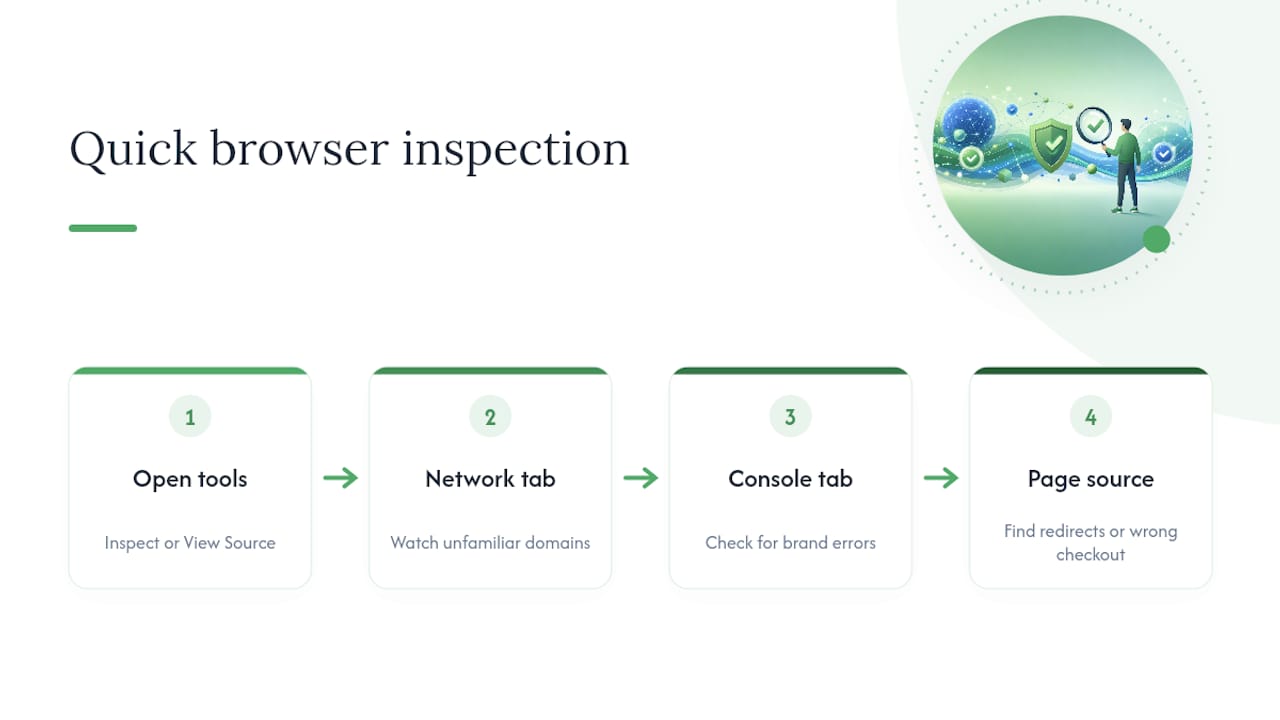
You don't need to be a developer to get value from your browser's built-in inspection tools, and this step catches things scanners miss entirely. Right-click anywhere on a page and select "Inspect" or "View Page Source" in Chrome, Firefox, or Edge to open a panel showing the site's underlying code.
Look at the "Network" tab while the page loads. A legitimate retail site typically loads resources from a handful of recognizable domains: its own, a payment processor, maybe an analytics service. A page quietly loading scripts from a dozen unfamiliar third-party domains, especially ones with random-looking names, is worth treating with suspicion.
The "Console" tab sometimes reveals errors that hint at a hastily cloned template, including broken references to a different company's brand name buried in the code. And a quick look at "View Page Source" can show hidden text, invisible redirect scripts, or a checkout form pointing to a completely different domain than the one in your address bar.
This step takes more effort than the others, so save it for sites where something already feels slightly off, not as a default step for every purchase.
Does Mobile Responsiveness Say Anything About Trust?
A site's behavior on your phone tells you almost as much as its behavior on desktop. Legitimate businesses, especially ones doing meaningful e-commerce volume, invest in mobile experience because most of their traffic arrives that way. A checkout page that's broken, oddly cropped, or impossible to navigate on a phone often signals a rushed, low-investment operation thrown together to catch traffic rather than serve customers long term.
Accessibility features matter too, and they're easy to check without any technical background. Try zooming in on text, tabbing through form fields with your keyboard, or testing whether buttons respond correctly to a tap versus a click. Sites built by teams that actually plan for a range of visitors and devices tend to handle these basics cleanly. Sites assembled overnight from a cloned template frequently don't, because whoever built it copied the look but skipped the underlying engineering.
None of this proves fraud by itself. A small, legitimate local business might have a clunky mobile site simply because it can't afford a developer. But when poor mobile design shows up alongside other red flags, like a brand-new domain or no verifiable contact information, it adds weight to the case for staying away.
What Design and Navigation Red Flags Signal Fraud?
Fraudulent sites tend to share a set of design habits, and once you know them, they're hard to miss.
Urgency is the biggest tell. Countdown timers, "only 3 left in stock" banners that never seem to change, and pop-ups warning you're about to lose a discount are all pressure tactics designed to short-circuit the careful thinking you'd otherwise do. Legitimate retailers use scarcity marketing too, but it's rarely the dominant feature of every single page.
Broken or inconsistent navigation is another giveaway. Menu items that lead nowhere, category pages that show the exact same products regardless of which category you clicked, or a footer stuffed with dozens of unrelated links are common on template-based scam sites built to look busy rather than function well.
Prices that seem too good relative to the category deserve a second look, especially paired with free shipping on expensive items and a checkout that only accepts wire transfer or gift cards. Trust seals and security badges are easy to fake, too. Consumer safety guides consistently point out that a badge image alone proves nothing since anyone can paste one onto a page.
Publisher Perspective: How Verified Fyi Approaches Website Validation
Running seven manual checks every time you shop online isn't realistic, which is exactly the gap Verified fyi was built to close. It weighs over 200 security, ownership, and reputation signals and returns a 0 to 100 trust score in seconds, giving you a fast read before you decide whether the manual digging is even necessary.
An automated score works well as a first filter for routine browsing and shopping decisions. It's not a substitute for judgment when real money is on the line, like a large purchase, a new business relationship, or anything involving upfront payment to a stranger. In those cases, pair the score with the manual checks covered above.
— Nick
Try Verified Fyi's Free Website Trust Checker
Running seven manual checks by hand every time you shop takes real effort, and most people skip it after the second purchase. Verified fyi does the heavy lifting instantly: paste any URL and get a 0 to 100 trust score, a plain-language verdict ranging from "dangerous" to "trusted," and a breakdown of exactly which signals pulled the score up or down.

If you run a website yourself, whether it's a small shop, a freelance service, or a growing business, the trust badge gives visitors visible proof that your site has been checked, which matters more every year as scam sites get harder to spot on sight alone. Curious how a site you already use stacks up? Browse recently checked websites to see real reports in action, or paste your own URL in and get your report now.
Sources
Bookmark these for the next time you need a fast answer:
- Google Safe Browsing transparency report — site-status (example link)
- 11 Ways to Verify Website Authenticity in 2026 | WhoisXML API
- Safe Browsing – Google Safe Browsing
- How to tell if a website is safe – Which?
FAQ
What is the fastest way to validate a website?
Run the URL through Google Safe Browsing's Site Status tool and a VirusTotal scan, both of which take under a minute combined. Following up with a quick Verified fyi trust score adds a broader check across ownership and reputation signals in one step.
Does HTTPS mean a website is safe?
No. HTTPS only confirms the connection is encrypted, and free certificates are widely available to anyone, including scammers, so a padlock icon alone doesn't prove legitimacy.
How can I tell if a website's reviews are fake?
Look for review text that reads nearly identically across different "customers," a rating count that spiked suddenly instead of growing gradually, and reviews that only exist on the site itself with none on independent platforms. Cross-checking reviews across multiple sources is one of the more reliable manual checks available to shoppers.
What should I do if I already paid a suspicious site?
Contact your bank or card issuer immediately and start a dispute, since credit cards and services like PayPal carry buyer protections that direct bank transfers don't. Document your order confirmation, screenshots, and any communication as evidence before escalating.
Is Verified fyi free to use?
Yes, the core website trust checker is free with no registration required. You paste a URL and get a 0 to 100 score along with a signal breakdown instantly.