AI decides whether a website is safe by scanning dozens of technical and behavioral signals at once, from URL structure to hosting history, and weighing them into a single risk score in under a second. That is the whole role of AI in content detection for site safety: speed and pattern recognition at a scale no human reviewer could match. If a checker flags a site, pause. Do not enter a password, a card number, or your name and address until you have run one or two secondary checks alongside it.
Here's what to do right now, before reading another word:
- Run the URL through an AI site checker like Verified fyi to get an instant trust score and evidence summary.
- Cross-check with a second source, such as a VirusTotal scan or a Google Safe Browsing lookup, to confirm the verdict independently.
- Look up the domain's age and WHOIS record. A site registered last week that claims to be a 20-year-old retailer is a red flag on its own.
AI is genuinely better than old-school blocklists at catching brand-new scam sites, sometimes called zero-day threats, because it looks for behavioral anomalies instead of matching against a known list. But it still makes mistakes, gets fooled by clever fakes, and works best paired with a second source and your own common sense.
Key Takeaways
AI improves website safety detection by fusing dozens of signals into a fast, explainable verdict, but it works best combined with a second, independent source and cautious human judgment.
| Point | Details |
|---|---|
| AI catches new scams faster | Behavioral analysis flags brand-new phishing sites before they hit any blocklist. |
| No single signal is proof | URL, HTML, visual, and linguistic cues only mean something combined, not alone. |
| Always run a second check | Pair any AI score with a VirusTotal or Google Safe Browsing lookup before acting. |
| Watch the label, not just the number | Dangerous or suspicious means stop; caution means verify further before proceeding. |
| Ask about data handling | A trustworthy checker discloses retention, corroborating sources, and opt-out options. |
| Verified fyi combines all of it | One instant 0 to 100 score, an evidence breakdown, and corroboration from Google Safe Browsing, VirusTotal, and WHOIS in a single check. |
Table of Contents
- The Role of AI in Content Detection for Unsafe Websites
- What AI Does Well and Where It Still Fails
- What Do Those Security Signals Actually Mean?
- How AI Turns All Those Signals Into a Score You Can Use
- A Step-by-Step Checklist Before You Trust Any Site
- Behind the Scenes: How the Best Detection Systems Actually Reason
- Questions Worth Asking Before You Trust a Detection Tool With Your Data
- Why I Trust the Layered Approach, Not the Single Score
- How Verified Fyi Fits Into Your Quick Safety Check
- Further Reading on AI Site Safety and Verification
- Sources
- FAQ
The Role of AI in Content Detection for Unsafe Websites
AI-driven site checkers don't look at one thing. They look at everything, simultaneously, and let a model decide how the pieces add up. That's the core shift from older security tools, which typically checked a URL against a static list of known bad addresses and little else.

A modern detection system pulls from several categories of evidence:
| Signal category | What it tells the AI |
|---|---|
| URL construction | Misspelled brand names, extra subdomains, unusual characters mimicking real letters |
| HTML structure | Hidden form fields, mismatched code patterns versus the real site |
| Visual similarity | Logo and layout matching against known brand screenshots |
| Linguistic cues | Urgency language, grammar errors, mismatched tone for the claimed brand |
| Hosting and WHOIS | Domain age, registrar history, hosting country versus claimed business location |
| Security headers | Missing encryption, weak or absent SSL configuration |
| Reputation and blacklists | Prior reports, blacklist appearances, community flags |
No single column in that table tells the whole story. A brand-new domain isn't automatically a scam; plenty of legitimate small businesses launch fresh sites every day. This is multimodal fusion in plain terms: combining weak individual signals into a strong collective verdict. Research on multimodal phishing detection systems backs this up directly, showing that models combining URL, HTML, linguistic, and visual data can achieve very high F1-scores on curated test sets, meaningfully outperforming any single-signal approach.
The flow is straightforward even if the math underneath isn't: signals go in, a trained model weighs them, and a score or verdict comes out. Better systems also generate a short, human-readable evidence list explaining why a site got flagged, rather than a black-box "trust us" verdict.
What AI Does Well and Where It Still Fails
AI earns its keep on speed and scale. It can evaluate a URL, a hosting profile, and a page's visual layout in under a second, something no human review team could do at the volume the modern web demands.
| Strengths | Limits |
|---|---|
| Detects brand-new (zero-day) scam sites before they're blacklisted | Vulnerable to adversarial tricks like slightly altered logos or cloaked content |
| Processes thousands of sites per second | Can produce false positives on legitimate but unusual sites |
| Combines many weak signals into one confident verdict | Explanations aren't always fully transparent to end users |
| Improves continuously as it sees new attack patterns | Struggles with entirely novel tactics it hasn't encountered |
Traditional blocklists only catch what's already been reported. AI-driven detection, by contrast, learns to spot deviations from normal patterns, which is why it catches new phishing domains earlier. PhishLang's research on client-side detection found meaningful improvements in catching zero-day phishing sites specifically because the model doesn't depend on an external blocklist that takes time to update.
The failure mode worth knowing about is adversarial manipulation. Scammers actively test their fake sites against popular detection tools and tweak them until they slip through. That's not a hypothetical; it's a documented cat-and-mouse dynamic in cybersecurity machine learning research, and it's exactly why no single AI verdict should be your only check.
Pro Tip: Treat an AI trust score the way you'd treat a smoke detector, not a fire marshal. It's an excellent early warning system, but when it goes off, you still look around before deciding what to do next.
The smartest approach layers AI pattern recognition with verified outside data, domain age, WHOIS records, and cross-checks like VirusTotal, rather than trusting any one signal alone.
What Do Those Security Signals Actually Mean?
Every category in that table above translates into something you could, in theory, spot yourself if you knew what to look for. AI just does it faster and across more sites than you ever could.
- URL construction: Watch for lookalike domains like "arnaz0n.com" or "paypal-secure-login.net." The AI flags character substitutions and unusual subdomain chains automatically.
- HTML structure: Fake sites often copy a real page's visible design but leave sloppy code underneath, mismatched form actions or scripts pulling from unrelated domains.
- Linguistic cues: Fake urgency is a classic tell. A line like "login immediately to avoid account closure" is exactly the kind of phrase AI language models are trained to flag.
- Hosting and WHOIS: A domain registered three days ago hosting a "20-year-old family business" doesn't add up, and WHOIS records show that gap instantly.
- Visual similarity: AI compares screenshots against a database of known brand assets, catching logo theft and near-identical page layouts even when the underlying code differs.
That visual matching piece deserves a closer look because it's how AI catches brand impersonation specifically. The system takes a screenshot of the suspicious page, extracts visual features, and compares them against known legitimate brand pages. A site that visually mimics a major bank down to the pixel, but sits on a domain the bank never registered, gets flagged even if the text content looks clean.
Pro Tip: Before you type a password anywhere, right-click the domain and search "[domain name] + WHOIS." If the registration date is measured in days, not years, treat that as a serious yellow flag regardless of what the page looks like.
How AI Turns All Those Signals Into a Score You Can Use
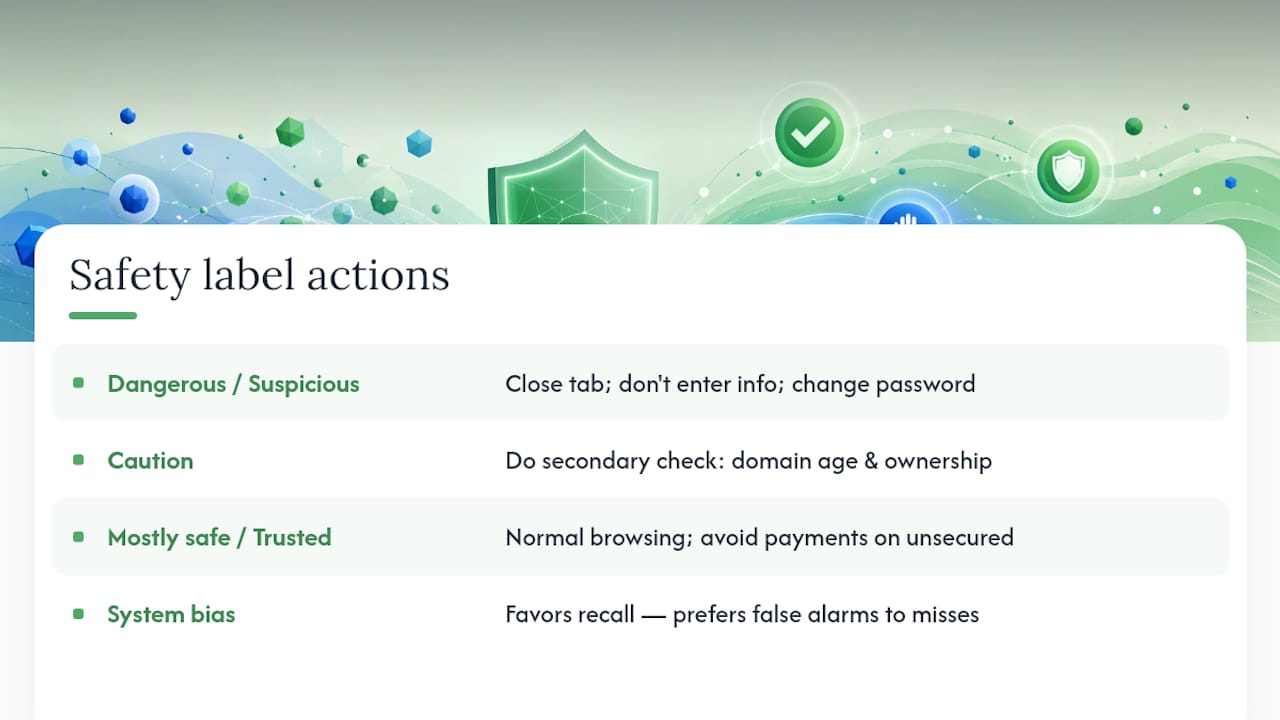
Once the signals are weighed, most AI-powered checkers translate the result into a plain-language label instead of a raw number only a data scientist could interpret. A typical scale runs from dangerous, to suspicious, to caution, to mostly safe, to trusted.
The tradeoff underneath that label matters more than most users realize. Detection systems have to choose between catching every possible threat (recall) and avoiding false alarms on legitimate sites (precision). Most consumer safety checkers bias toward higher recall, meaning they'd rather flag a legitimate site by mistake than let a real scam slip through unnoticed. That's the right call for protecting everyday users, but it also means an occasional "caution" label on a perfectly fine small business site isn't unheard of.
Here's how to act on each label without overreacting or underreacting:
Dangerous or suspicious: Don't enter any information. Close the tab. If you already entered a password there, change it immediately on the real site.
Caution: Proceed only after a secondary check confirms the domain's age and ownership look legitimate.
Mostly safe or trusted: Normal browsing is fine, though it's still smart to avoid entering payment details over an unsecured connection.
A Step-by-Step Checklist Before You Trust Any Site
This is the part you can actually copy and use the next time a link looks even slightly off.
- Paste the URL into an AI site checker and read the trust score.
- Open the evidence summary, most tools list exactly which signals raised concern.
- Run a quick secondary lookup through VirusTotal or Google Safe Browsing.
- Check the domain's registration date through a free WHOIS lookup.
- If anything is flagged as dangerous or suspicious, do not enter credentials or payment information, period.
Watch for these red flags regardless of what the score says:
- Urgent countdown timers or "act now" language pressuring an immediate decision
- Payment requests only through gift cards, crypto, or wire transfer
- A domain that doesn't match the brand name it claims to represent
- Poor grammar in what's supposed to be professional communication
One practical note: mobile browsers often hide the full URL bar, making lookalike domains harder to spot on a phone than on a desktop. When something feels urgent, a quick habit of moving to a desktop browser for a second look, where security warnings and full addresses are easier to see, pays off more often than people expect.
Behind the Scenes: How the Best Detection Systems Actually Reason
You don't need to understand the engineering to use a checker well, but knowing what's happening underneath builds reasonable trust in the verdict.
The most accurate systems today don't rely on a single AI model making one judgment call. Instead, they run something closer to a debate among specialized reviewers. A framework called PhishDebate assigns separate AI agents to analyze the URL, the HTML code, the written content, and potential brand impersonation independently, then combines their findings.
A related system, MemoPhishAgent, adds something closer to memory: it reuses reasoning from past cases it has already evaluated, which improved both detection efficiency and stability in production deployment. The benefit for you as a user isn't abstract. Multi-agent and memory-augmented approaches translate into fewer uncertain "I'm not sure" verdicts and clearer explanations when a site does get flagged.
Questions Worth Asking Before You Trust a Detection Tool With Your Data
Not every AI site checker handles your data the same way, and that matters, especially for freelancers and small-business owners checking client or vendor sites that involve sensitive business relationships. Before you rely on any tool regularly, it's worth asking:
- Do you store the URLs I submit, and for how long?
- How do you explain a flagged result, do I get evidence or just a score?
- What outside data sources corroborate your AI's findings?
- Can I opt out of having my search history retained?
- Does a free tier limit how many checks I can run, and does that affect accuracy?
A trustworthy tool should be transparent about querying outside sources like Google Safe Browsing or VirusTotal to corroborate its own AI findings, rather than presenting a lone AI opinion as gospel. Guides to AI compliance and data privacy suggest asking directly about retention and third-party sharing before you make a habit of submitting URLs, especially ones tied to client work. Free tiers also sometimes carry rate limits that push more processing to less transparent backend systems, so read the privacy notes even on a service that costs nothing.
Why I Trust the Layered Approach, Not the Single Score
Verified fyi exists because a lone trust score, however well-built, is only as useful as the checks a person is willing to run alongside it. What convinces me the layered model works isn't just the accuracy numbers, though multimodal detection research backs that part solidly. It's that even the most sophisticated multi-agent systems in academic research still get paired with human review before high-stakes decisions get made. That's not a weakness of AI. It's just an honest acknowledgment of what pattern recognition can and can't promise.
[brand_signal]
The everyday version of that same discipline is simple: let AI do the heavy lifting on signal analysis, then spend the fifteen extra seconds confirming with a second source before you type anything sensitive. That habit costs you almost nothing and it's the single biggest thing separating people who avoid scams from people who don't.
[author_bio]
How Verified Fyi Fits Into Your Quick Safety Check
Verified fyi gives you the fastest version of the layered check this guide just walked through, all in one place instead of three separate tabs. Paste any URL and you get a 0 to 100 trust score, a plain-language breakdown of exactly which signals raised concern, and a category label from dangerous to trusted, no technical background required.

The process takes seconds: paste the URL, review the score, then open the evidence summary to see the actual reasoning behind it. Verified fyi corroborates its own findings against outside sources including Google Safe Browsing, VirusTotal, and WHOIS data, so you're never relying on a single opinion in isolation. That's the same layered principle this whole article has been arguing for, just built directly into the tool instead of something you have to assemble yourself across multiple sites.
Curious how the scoring actually works under the hood? The full methodology breakdown explains which of the 200-plus signals carry the most weight and why. Or skip straight to seeing it in action by browsing recently checked websites to see real trust scores and evidence summaries before you run your own.
Further Reading on AI Site Safety and Verification
- Google Safe Browsing for checking whether a URL is already flagged across Google's ecosystem.
- PhishDebate's multi-agent research for a technical look at how debate-based AI reasoning improves phishing detection.
- MemoPhishAgent's production deployment findings for insight into memory-augmented detection at scale.
- Verified fyi's methodology page for a full explanation of the 200-plus signals behind every trust score.
Whenever possible, treat an AI score as your starting point and confirm it against at least one outside source before making a final call.
Sources
Yes. Verified fyi combines AI-weighted analysis of over 200 signals with corroborating data from sources like Google Safe Browsing, VirusTotal, and WHOIS to produce its trust score.
- A Multimodal Phishing Website Detection System Using Explainable Artificial Intelligence Technologies
- PhishDebate: An LLM-Based Multi-Agent Framework for Phishing Website Detection
- MemoPhishAgent (MPA) — ACL Industry 2026
- PhishLang: A Real-Time, Fully Client-Side Phishing Detection Framework Using MobileBERT
FAQ
What role does AI play in detecting unsafe websites?
AI analyzes dozens of signals, including URL structure, hosting history, and visual layout, simultaneously to produce a real-time risk score, something static blocklists can't do for brand-new threats.
Can AI detection tools make mistakes?
Yes. AI can produce false positives on unusual but legitimate sites and can be fooled by adversarial tricks like near-identical logos, which is why pairing it with a second check matters.
What should I do if a checker flags a site as suspicious?
Stop before entering any personal or payment information, then confirm with a secondary source like a VirusTotal scan or a WHOIS lookup before deciding how to proceed.
How is AI detection different from traditional blocklists?
Blocklists only catch sites already reported as unsafe, while AI models identify behavioral anomalies, letting them flag brand-new scam sites before they're ever blacklisted.