
TL;DR:
- Verified fyi provides immediate, evidence-backed trust scores for URLs, helping parents assess website safety before children visit. It analyzes over 200 signals across categories like security, ownership, reputation, and content, with transparent results including raw evidence. A low score may not mean a site is malicious, but trust indicators like blacklist matches act as a definitive warning.
Paste any URL into Verified fyi for an instant, evidence-backed 0–100 trust score and a clear verdict before your child visits a single page. Before you even run that check, glance for three quick signals: a padlock icon and HTTPS in the address bar, a correctly spelled domain with no typosquatting (think "amaz0n.com" vs. "amazon.com"), and a domain age of at least a few months via WHOIS. Then paste the URL and review the verdict alongside the raw evidence, not just the number.
Quick actions:
- Site scores 75–100: Generally safe to allow with normal supervision.
- Site scores 50–74: Investigate the risk breakdown before proceeding.
- Site scores below 50: Avoid and report; do not enter payment details.
- Any flagged site: Close the tab, clear cookies, and run a local malware scan.
Table of Contents
- How are AI site-safety scores generated?
- How to run a URL check and read the results
- What each score range means and what to do next
- Why a low score doesn't automatically mean "scam"
- What to do when a site is flagged unsafe
- How Verified fyi calculates scores and what transparency looks like
- Key Takeaways
- Why transparent scoring matters more than a single number
- Verified fyi gives parents instant, free URL checks with full evidence
- Useful sources
- FAQ
How are AI site-safety scores generated?
A trust score is not a single measurement. It is a weighted summary of signals pulled from several distinct categories, each probing a different dimension of a site's credibility.
The primary signal categories most reliable checkers analyze include:
- Technical security: TLS/HTTPS configuration, certificate issuer and expiry, and the presence of security headers (Content-Security-Policy, HSTS, X-Frame-Options).
- Domain and ownership: WHOIS records, domain age, registrar reputation, and whether ownership details are hidden behind a privacy proxy.
- Reputation feeds: Blocklist matches, phishing databases, and community-flagged reports.
- Content and behavior: Phishing language patterns, auto-download triggers, suspicious payment forms, and redirect chains.
- Transparency signals: Whether a site publishes a privacy policy, contact information, and verifiable business details.
Statistic: Google Safe Browsing protects over five billion devices daily by delivering real-time warnings before users navigate to dangerous websites. Checkers that ingest this feed inherit a significant layer of protection.
The best checkers combine rule-based checks (a certificate is either valid or it isn't) with AI advisory signals that weigh contextual patterns. That hybrid approach, similar to the 70/30 rule-plus-AI architecture used in explainable scoring systems, reduces false positives that a purely algorithmic pass would generate.
Pro Tip: A trustworthy checker must show raw evidence, not just a number. Look for specific detections: the certificate issuer, the exact blacklist name, the header that failed. An opaque score with no supporting detail is not something you can act on.
How to run a URL check and read the results
Speed matters when a child is waiting to visit a site. Here is the procedure to follow every time.
- Do a quick browser check first. Look for HTTPS and a padlock in the address bar. Read the domain carefully for misspellings or extra characters. Simple browser-level checks catch the most obvious red flags before you run any tool.
- Paste the URL into Verified fyi. Go to verified.fyi, paste the full URL, and wait for the instant result. No account required.
- Scan the risk breakdown, not just the score. Open the detailed breakdown and look at each category. A score of 62 driven by a single misconfigured header is very different from a 62 driven by a blacklist match.
- Cross-check when the stakes are high. For any site where a child might enter personal details or where you plan to make a purchase, verify the Google Safe Browsing status independently.
When reading results, watch for these specific red flags:
- Active malicious flags or blacklist matches (phishing, malware, spam).
- Certificate errors: expired, self-signed, or issued to a mismatched domain.
- Typosquatting or impersonation signals in the domain structure.
- Suspicious download triggers or aggressive redirect chains.
- No contact information, or contact details that contradict WHOIS ownership records.
- Recent negative reviews or unresolved BBB complaints surfaced in the reputation section.
On privacy: a well-designed instant checker runs its analysis against publicly available signals and does not store the full page content of the URL you submit. Verified fyi's checks are free and return results in seconds.
What each score range means and what to do next
A number between 0 and 100 only helps if you know what it is telling you. Here is how to translate score bands into concrete decisions.

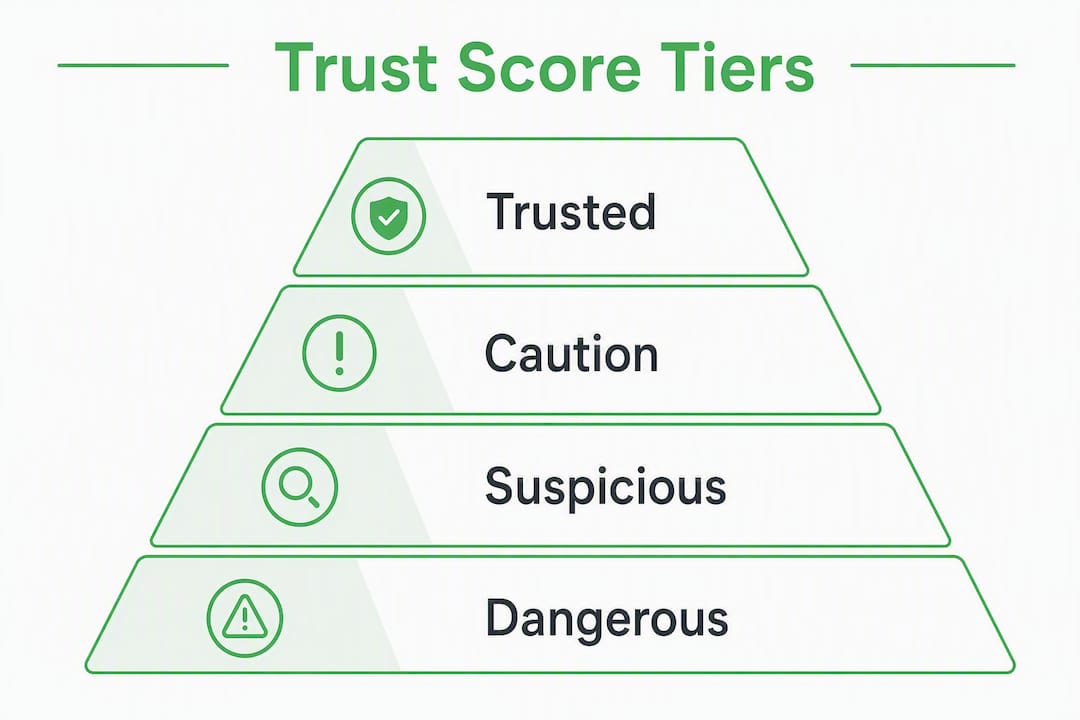
75–100 (Trusted / Mostly Safe). The site passes the majority of technical, ownership, and reputation checks. Allow access with normal supervision. No special action needed, though you should still watch for behavioral changes on the page itself.
50–74 (Caution / Low Risk). Something raised a flag, but it may be minor. Read the sub-scores. If the deduction came from a missing security header rather than a blacklist match, the risk is lower. Investigate before allowing purchases or account creation.
25–49 (Suspicious). Multiple signals failed or a reputation flag is present. Avoid entering any credentials or payment details. Look at the ownership and reputation sub-scores specifically. If the site is a merchant, search for independent reviews before proceeding.
0–24 (Dangerous). Active malicious detections. Close the tab immediately. If a transaction already occurred, contact your bank or credit card issuer. Report the URL (see Section 6 below).
For borderline sites in the 50–74 range, supervised browsing is a practical middle ground: stay present while your child uses the site, disable autofill for payment fields, and revisit the score in a few days since scores update as new signals come in. The website safety rating guide on Verified fyi explains each category in more detail if you want to dig deeper.
Why a low score doesn't automatically mean "scam"
Automated scores can misfire, and understanding why prevents unnecessary panic.
Common causes of false positives include newly launched legitimate sites with short operating histories, TLS or header misconfigurations that a developer simply hasn't fixed yet, regional registrar quirks that make WHOIS data appear incomplete, and temporary security compromises that have since been resolved. Different checkers use different data sets, so two tools can return meaningfully different scores for the same URL. That disagreement is not a flaw; it is a signal to read the evidence rather than trust either number blindly.
Pro Tip: If a site is flagged but the raw evidence shows only a technical header issue (no blacklist match, no phishing detection, valid certificate), consider contacting the merchant directly before concluding the site is malicious. A missing Content-Security-Policy header is a developer oversight, not a scam.
Parallel scanning architectures, like the concurrent scanner design used in modern trust checkers, reduce partial results caused by slow third-party APIs. Even so, no single scan is infallible. Cross-checking remains the most reliable habit.
What to do when a site is flagged unsafe
If a site returns a dangerous or suspicious verdict, or if your child has already visited it, act in this order.
- Close the tab and do not interact with any prompts or pop-ups on the page.
- Clear the device's cookies and browser cache to remove any tracking scripts that may have loaded.
- Run a local antivirus or malware scan. Protecting your device from malware is the fastest way to catch anything that slipped through before the check.
- Change passwords immediately if any credentials were entered on the flagged site.
For reporting and follow-up:
- Submit the URL to Google Safe Browsing via the report page so other users are warned.
- Flag the site on Verified fyi for a re-scan and to add it to the community report queue.
- Contact your bank or credit card issuer right away if payment details were entered; dispute the charge and request a card replacement if necessary.
For children specifically, watch for signs of phishing follow-through: unexpected emails asking for personal details, unfamiliar charges on linked accounts, or new apps that appeared without explanation. If a child entered a school email or login credentials, notify the school's IT department.
How Verified fyi calculates scores and what transparency looks like
Verified fyi analyzes 200+ signals across six primary categories to produce a 0–100 trust score with categorical verdicts (dangerous, suspicious, caution, mostly safe, trusted) and a full risk breakdown parents can read line by line.
| Signal Category | Example Evidence Shown |
|---|---|
| Security / TLS | Certificate issuer, expiry date, chain validity |
| Security Headers | CSP, HSTS, X-Frame-Options presence or absence |
| Domain / WHOIS | Registration date, registrar, privacy proxy status |
| Reputation Feeds | Google Safe Browsing match, blocklist names |
| Behavioral Indicators | Redirect chains, auto-download triggers |
| Content Signals | Phishing language patterns, contact info presence |
The scoring methodology is publicly documented, which means you are not trusting a black box. You can see which category drove a low score and decide whether that category is relevant to your specific concern. A site flagged only for a missing HSTS header presents a different risk profile than one with an active Google Safe Browsing match.
Statistic: Google Safe Browsing protects over five billion devices daily, making it one of the most authoritative reputation feeds any checker can ingest.
Key Takeaways
Verified fyi's instant URL checker gives parents a transparent, evidence-backed 0–100 trust score drawn from 200+ signals, including Google Safe Browsing, WHOIS data, and TLS checks, so every verdict comes with the raw evidence to act on it.
| Point | Details |
|---|---|
| Use instant checkers | Paste any URL into Verified fyi for a free, immediate trust score before your child visits. |
| Read raw evidence | A score alone is not enough; check which specific signals (blacklist match, header issue) drove the result. |
| Prioritize reputation flags | A Google Safe Browsing match or blacklist hit is a hard stop; a misconfigured header is not. |
| Cross-check when stakes are high | For shopping or account creation, verify Safe Browsing status independently alongside your primary scan. |
| Verified fyi shows its work | Its publicly documented methodology maps every signal category to the evidence it surfaces. |
Why transparent scoring matters more than a single number
Most parents want a simple answer: safe or not safe. That instinct is understandable, but an opaque verdict without evidence puts you in a worse position than no check at all. You either over-trust a passing score or over-react to a failing one, with no way to tell which response is right.
The tools worth relying on are the ones that show their reasoning. When a checker surfaces the specific blacklist that flagged a site, the certificate issuer, the domain registration date, and the exact header that failed, you can make a judgment call. You can see whether the risk is technical or behavioral, whether it is active or historical, and whether it warrants a hard block or a cautious second look.
Automated checks are decision-support, not verdicts handed down from authority. Treat them that way, and they become genuinely useful. Treat them as infallible, and you will eventually block a legitimate site your child needed or, worse, wave through a dangerous one because the score looked acceptable.
Verified fyi gives parents instant, free URL checks with full evidence
When you need to know whether a site is safe before your child clicks through, Verified fyi delivers a free, instant 0–100 trust score backed by 200+ signals, including Google Safe Browsing, WHOIS records, and TLS analysis, with a full risk breakdown you can actually read.

No account needed. Paste the URL, get the verdict, and see exactly which signals drove it. Browse recently checked websites to see how the tool presents evidence on real sites, or go straight to verified.fyi to run your first check now. Verified fyi's core verification features are free. Affiliate links to recommended security products (such as VPNs and password managers) may appear alongside results; those recommendations help support the platform while keeping checks free for every parent who needs them.
Useful sources
The claims in this article draw on the following primary sources. Each link goes directly to the original resource so you can verify independently.
| Source | Claim Supported |
|---|---|
| Google Safe Browsing | Protects 5+ billion devices daily; authoritative reputation feed |
| Google Transparency Report | Safe Browsing status lookup for independent cross-checks |
| Verified fyi | 200+ signal analysis, 0–100 score, instant free checks |
| Verified fyi Methodology | Documented signal categories and scoring weights |
| How Parents Assess Site Safety | Technical misconfigurations and false-positive guidance |
| TrustLens (GitHub) | Explainable AI scoring architecture and evidence transparency |
| AI-Signed / Lake Forest Computer | Concurrent scanner design and reliability architecture |
| Moody Media — Trust Scores | Why scores vary across tools; cross-checking rationale |
| Norton Safe Browsing Guide (US) | Consumer checklist: SSL, reviews, contact info, site checkers |
FAQ
What is a URL trust score and how is it calculated?
A URL trust score is a 0–100 rating generated by analyzing signals across technical security, domain ownership, reputation feeds, and content behavior. Verified fyi weighs 200+ such signals and returns a categorical verdict alongside the raw evidence.
Can a safe site score low on a URL checker?
Yes. Newly launched sites, misconfigured security headers, or regional WHOIS quirks can lower a score without indicating malicious intent. Always read the specific signals that drove the result before blocking a site.
Which signal should parents treat as a hard stop?
An active Google Safe Browsing match or a named blacklist detection is a hard stop. A missing security header or short domain age alone warrants caution but not an automatic block.
How do I report a dangerous site I found?
Submit the URL to Google Safe Browsing via the Transparency Report and flag it on Verified fyi for a re-scan. If payment details were entered, contact your bank immediately.
Is Verified fyi free to use?
Yes. All core URL verification features on Verified fyi are free and require no account. Affiliate links to security products may appear alongside results, but the checks themselves carry no cost.