TL;DR:
- Always verify online store URLs with a trusted safety scanner before entering payment details.
- Check domain age, contact info, and reviews to identify potential scam stores rapidly.
Before you enter your card number anywhere, do one thing: paste the store's URL into a site-safety scanner. Verified fyi analyzes over 200 security, ownership, and reputation signals in seconds and returns a 0–100 trust score with a plain-language verdict. That single check catches the majority of scam storefronts before they cost you anything.
The Federal Trade Commission (FTC) receives millions of fraud reports each year, and online shopping scams consistently rank among the top categories. Scammers build convincing storefronts fast, sometimes overnight, and many look nearly identical to real retailers. The good news: a short, structured check almost always reveals the truth.
Pro Tip: University of Colorado security researchers warn that urgency tactics like countdown timers and "only 3 left" notices are designed to stop you from pausing to verify. The moment you feel rushed, that's your signal to slow down, not speed up.
Table of Contents
- Your pre-purchase checklist to spot scam stores fast
- How scammers make fake stores look real
- Step-by-step: how to verify any store before you pay
- Which tools help you check a site's legitimacy quickly?
- What to do if you already paid a suspicious site
- Long-term habits that keep you safer while shopping online
- Key Takeaways
- The check most shoppers skip
- Check any site instantly with Verified fyi
- Useful sources
- FAQ
Your pre-purchase checklist to spot scam stores fast
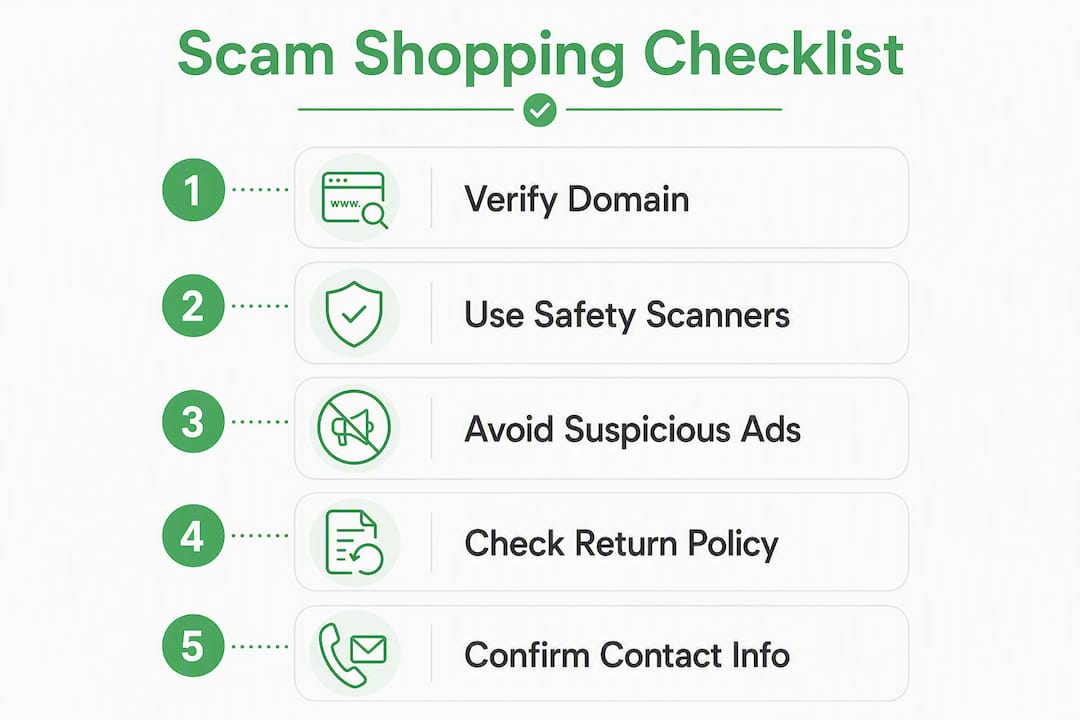
Run these ten checks before you pay. Most take under 30 seconds each.
- Domain match: The URL should match the brand name exactly. Look for swapped letters, added words, or hyphens (e.g.,
amaz0n-deals.cominstead ofamazon.com). - Domain age: New domains are a red flag. Use a WHOIS lookup to check when the site was registered. Scam sites are often days or weeks old.
- HTTPS + certificate: Click the padlock and confirm the certificate is issued to the company you expect. HTTPS alone proves nothing about legitimacy.
- Contact information: A real business lists a phone number, physical address, and a business-domain email. A Gmail or Outlook address is a soft warning.
- Payment methods: Credit cards and PayPal offer buyer protection. Wire transfers, cryptocurrency, or gift cards do not.
- Prices: Unrealistically large discounts on brand-name goods are a classic red flag.
- Independent reviews: Search the store name plus "reviews" or "scam" on Google. Check Trustpilot and the Better Business Bureau (BBB). No results at all is itself a warning.
- Social media presence: Real brands have active accounts with history. A store whose only social presence is a single sponsored ad deserves extra scrutiny.
- Return and refund policy: Vague, missing, or copy-pasted policies with no specifics are a red flag. Read the fine print.
- Test contact: Send a pre-sale question about returns before you buy. A legitimate business replies from a business domain with specific, useful details.
Pro Tip: If a deal arrived via a sponsored Instagram or Facebook ad, skip the ad link entirely and type the retailer's name directly into your browser. Scammers buy ads that look indistinguishable from real brand promotions.
How scammers make fake stores look real
Understanding the playbook makes the red flags easier to catch.
Urgency and scarcity pressure are the most reliable tools in a scammer's kit. Security researchers at the University of Colorado specifically call out countdown timers and "limited stock" warnings as tactics designed to trigger impulsive purchases before a shopper can verify anything. The pressure feels real even when you know it's manufactured.
Social media ads are now the primary gateway to fake storefronts. Sponsored posts on Instagram and Facebook frequently link directly to cloned or fraudulent stores, and some use stolen influencer images to build false credibility. Experts advise treating any deal that originated in a social media ad as unverified until you've confirmed the domain independently.
Design and content tricks are subtler. Scammers copy product photos, descriptions, and even entire page layouts from legitimate retailers. A professional-looking site is not proof of legitimacy. HTTPS and a padlock icon can be obtained by anyone, including scammers, so a secure connection only means your data is encrypted in transit, not that the recipient is trustworthy. Fake review widgets and fabricated trust seals round out the illusion.
Step-by-step: how to verify any store before you pay
Follow this workflow in order. Each step builds on the last.
- Run the URL through safety scanners. Paste the URL into Google Safe Browsing, VirusTotal, and Verified fyi. Any flagged result is a reason to walk away.
- Reverse image search product photos. Right-click a product image and run it through Google Images or TinEye. Cloned images appearing across dozens of unrelated sites confirm a scam.
- Confirm payment options — Credit cards and PayPal are your safest choices. If the only options are wire transfer, crypto, or gift cards, leave.
| Check | Pass | Fail |
|---|---|---|
| Domain age | Registered 1+ year ago | Registered within weeks |
| HTTPS certificate | Issued to named business | Generic or mismatched |
| Safety scanner result | No flags | Any flag or warning |
| Product image search | Unique to this store | Appears on many sites |
| Contact info | Business domain, address | Gmail, no address |
| Payment options | Credit card, PayPal | Wire, crypto, gift card |
Three hard exit conditions: any safety scanner flag, wire/crypto-only payment, or a domain registered within the past 30 days claiming to be an established brand. Walk away on any one of these.
Pro Tip: Before placing an order, send the store a quick email asking about their return window. A real business replies within a business day with specific details. No reply, or a vague non-answer, tells you everything you need to know.
Which tools help you check a site's legitimacy quickly?
- Verified fyi: Pulls signals from Google Safe Browsing, VirusTotal, WHOIS records, and public reviews to produce an instant 0–100 trust score with a categorized verdict. It's the fastest single-tool check available for shoppers.
- Google Safe Browsing: Google's transparency report lets you paste any URL and see whether it's flagged for phishing or malware. Free and authoritative.
- VirusTotal: Scans a URL against 70+ security vendors simultaneously. Useful for a second opinion when a site looks borderline.
- WHOIS lookup: Public WHOIS services (ICANN's lookup tool, for example) show domain registration date, registrar, and sometimes owner details. Domain age is one of the most reliable scam signals.
- Reverse image search (Google Images / TinEye): Drag a product photo into either tool to see where else that image appears online. Scam sites routinely reuse images from legitimate retailers.
- Browser security extensions: Extensions like those from reputable security vendors can flag dangerous sites before you even land on them. Keep them updated.
One important limitation: HTTPS and a padlock do not confirm legitimacy. Brand-new scam sites also slip past scanners before they've been reported. Combining at least two tools gives you much stronger confidence than relying on any single check.
What to do if you already paid a suspicious site
Act fast. Every hour matters.
- Call your card issuer immediately. Request a chargeback and ask for a new card number. Visa and Mastercard both have formal dispute processes; your issuer can initiate one over the phone. The sooner you call, the better your odds of recovery.
- Change reused passwords. If you used the same password on that site as on your email, bank, or other accounts, change it everywhere now and enable multi-factor authentication (MFA) on each.
- Preserve evidence. Screenshot the store's homepage, your order confirmation, any emails, and the transaction record. Save the URL and the date. You'll need these for every report you file.
- Report to the FTC. File at ReportFraud.ftc.gov. The FTC uses these reports to track scam networks and issue warnings.
- File with the IC3. The FBI's Internet Crime Complaint Center (ic3.gov) handles online fraud reports and can escalate cases involving significant losses.
- Report to the BBB. The Better Business Bureau's Scam Tracker helps warn other shoppers and creates a public record.
- Alert your state Attorney General. Most state AG offices have a consumer protection division that handles online fraud.
If you paid by bank transfer, gift card, or cryptocurrency, recovery is unlikely but not impossible. Contact your bank immediately anyway, and report to the FTC regardless. For gift cards, call the card issuer's fraud line.
Watch for identity theft. If you entered your Social Security number or date of birth, place a fraud alert with one of the three major credit bureaus (Equifax, Experian, or TransUnion). A freeze is free and stops new accounts from being opened in your name.
Long-term habits that keep you safer while shopping online
Small, consistent habits reduce your exposure far more than any single tool.
- Use a credit card as your default payment method. Credit cards carry federal chargeback protections that debit cards and bank transfers do not. Some issuers also offer virtual card numbers for one-time use.
- Never save payment details on unfamiliar stores. Stored card data on a breached site is a direct path to fraud.
- Use a password manager. A password manager generates and stores unique passwords for every site, so one compromised account doesn't cascade into others.
- Enable 2FA on your email and financial accounts. Your email is the master key to every other account. Protect it first.
- Navigate directly, not through ads. Type retailer names into your browser or use a saved bookmark. Avoid clicking shopping links in unsolicited emails or social media ads.
- Set up transaction alerts. Most banks and card issuers offer real-time SMS or app notifications for every charge. You'll spot unauthorized transactions within minutes.
- Check your credit report regularly. AnnualCreditReport.com gives you free access to all three bureaus. Review for accounts you didn't open.
Pro Tip: When a deal from an unfamiliar store looks genuinely good, search the store name plus "legit" or "scam" before you buy. Real shoppers leave traces online. No traces at all is itself a red flag.
Key Takeaways
The single most effective way to avoid fake shopping websites is to pause, verify the domain's age and reputation, and run the URL through a safety scanner before you enter any payment information.
| Point | Details |
|---|---|
| Check domain age first | A WHOIS lookup revealing a site registered within weeks is a hard stop, regardless of how professional it looks. |
| HTTPS is not enough | A padlock only means traffic is encrypted; scammers obtain certificates too, so always run a reputation scan. |
| Use a safety scanner | Paste any unfamiliar URL into Verified fyi, Google Safe Browsing, or VirusTotal before paying. |
| Act fast after exposure | Contact your card issuer for a chargeback, change reused passwords, and enable MFA within hours of suspecting fraud. |
| Verified fyi as your first check | Verified fyi's 0–100 trust score aggregates 200+ signals in seconds, giving you a clear buy-or-walk verdict. |
The check most shoppers skip
Most people who get burned by a fake store didn't miss the red flags entirely. They saw them and kept going anyway, because the deal looked too good to pass up or the site looked polished enough to trust. That's the real vulnerability: not ignorance, but the willingness to override your own skepticism under time pressure.
The single check that would have stopped most of those purchases is the domain age lookup. A site that's been live for 11 days cannot be the established brand it claims to be. That one fact, visible in 30 seconds on any WHOIS tool, is more reliable than any trust seal or five-star review widget on the page. Pair it with a quick scanner run, and you've done more than most shoppers ever do.
The other habit worth building: test the store's support before you buy anything. Send a question about returns. The reply, or the silence, is your real review.
Check any site instantly with Verified fyi
Verified fyi gives you a clear, immediate answer on whether a store is safe to buy from. Paste any URL and get a 0–100 trust score built from over 200 signals: security certificates, domain history, WHOIS records, Google Safe Browsing data, VirusTotal results, and independent reviews. The verdict comes back in seconds, categorized as dangerous, suspicious, caution, mostly safe, or trusted.

Two steps: paste the URL, read the score and the key risk flags. That's the whole workflow. You can also browse recently checked sites to see what other shoppers have flagged. All core checks are free. Before you buy from any store you haven't used before, run it through Verified fyi first.
Useful sources
Authoritative U.S. resources for checking sites and reporting scams:
- FTC — ReportFraud.ftc.gov: File a scam report; the FTC uses submissions to track fraud networks and issue consumer alerts.
- IC3 — ic3.gov: FBI's Internet Crime Complaint Center for online fraud reports, including fake shopping sites.
- FDIC — Avoid Scams While Shopping Online: Federal guidance on fake websites, apps, and payment fraud.
- Google Safe Browsing Transparency Report: Free URL check against Google's phishing and malware database.
- ICANN WHOIS Lookup: Check domain registration date, registrar, and ownership details.
- Better Business Bureau Scam Tracker: Search and report scam businesses; useful for checking a store's complaint history.
- TinEye Reverse Image Search: Detect cloned product images used across multiple scam storefronts.
- University of Colorado — How to Spot Fake Online Stores: Security research on urgency tactics and verification steps.
FAQ
How do I quickly check if a shopping website is legitimate?
Paste the URL into Verified fyi or Google Safe Browsing for an instant safety verdict, then confirm the domain age via WHOIS and search the store name plus "reviews" on Google.
Does HTTPS mean a shopping site is safe?
No. HTTPS only encrypts your connection; scammers obtain certificates too. Always combine an HTTPS check with a reputation scan and domain age lookup.
What should I do if I paid a fake shopping site?
Call your card issuer immediately to dispute the charge and request a new card number, then change reused passwords and enable MFA. File a report with the FTC at ReportFraud.ftc.gov and the FBI's IC3.
Are social media shopping ads safe to click?
Treat them as unverified. Sponsored ads on Instagram and Facebook frequently link to fake stores; skip the ad link and type the retailer's name directly into your browser instead.
What payment method is safest for online shopping?
Credit cards offer the strongest buyer protection through chargeback rights. Avoid wire transfers, cryptocurrency, and gift cards, which offer no recourse if the seller is fraudulent.