Your contact page is doing more work than you think. Add three things right now: a verified email badge showing your confirmation method, a phone number with OTP validation noted, and a physical address or clearly stated service area. Then run a quick audit at Verified fyi to get a trust report you can link directly from that page. That single link tells visitors your site has been independently checked across 200+ security and reputation signals.
- Verified email badge: Display the confirmation method (e.g., "Email confirmed via reply link") next to your address.
- OTP-enabled phone: Note that callers or form submitters receive a one-time code to confirm the line is live.
- Physical address or service area: Even a county or metro region beats a blank field.
The role of contact page authenticity is not cosmetic. It is the fastest, most measurable trust signal your site can publish today.
Table of Contents
- What does "contact page authenticity" actually mean?
- Why authentic contact pages move your business metrics
- What verification signals should you show on your contact page?
- Technical checklist: how to verify contact methods step by step
- Legal and privacy rules US businesses must follow
- How to measure the impact of contact page improvements
- A realistic 4–8 week plan with cost estimates
- Key Takeaways
- The contact page is where trust becomes real
- Verified fyi gives you a trust report in seconds
- Useful sources and further reading
- FAQ
What does "contact page authenticity" actually mean?
An authentic contact page proves your business is reachable and accountable through verifiable channels and metadata, not just visually present. The distinction matters because a generic contact form with no name, no domain-matched email, and no address looks identical to a scam page at first glance.
Components that genuinely count as authentic:
- An operational email address on your own domain, confirmed via reply link or SPF/DKIM/DMARC alignment
- A phone number tested for live response, ideally with OTP validation documented
- A physical address or defined service area consistent with your WHOIS/RDAP registration data
- Named contacts with roles (not just "The Team")
- A stated response SLA ("We reply within one business day")
- Links to your privacy policy and terms of service
Authentic contact information is operationally verified, not just syntactically valid. A correctly formatted email address that bounces is not authentic. A phone number that rings to voicemail with no callback is not authentic. Authenticity requires an affirmative, working response.
Weak signals that do not count: a third-party directory listing you did not create, a copy-pasted address that differs from your domain registration, or a generic contact form with no named recipient. These are cosmetic, and experienced users spot them fast.
Why authentic contact pages move your business metrics
A well-structured contact page is a direct SEO and trust signal that affects Google's E-E-A-T evaluation and local search visibility. When your contact data is consistent across your site and external listings, local rankings improve. When it is inconsistent or missing, Google has less reason to surface you.
The conversion case is equally direct. According to contact page design research, Many people say contact information is the most important missing element on a website. Visitors who cannot find a real phone number or address leave without converting, and many file fraud reports or chargebacks when they later feel deceived.
Downstream benefits of verified contact data:
- Higher lead quality, because real channels filter out bots and bad-faith inquiries
- Fewer chargebacks, since customers who can reach you resolve disputes before escalating
- Reduced fraud reports and suspicious-site flags from browsers and security tools
- Better affiliate conversion rates, since trust-verified sites see lower bounce rates on offer pages
Site verification also protects shoppers from scams, which means your verified contact page actively reduces the risk that a visitor reports your site as unsafe.
Stat to know: RrSG registration data accuracy guidance requires registrants to update contact information within 7 days of a change, and registrars must verify or risk service suspension. That is the operational standard your contact page should match.
What verification signals should you show on your contact page?
Place your primary form above the fold, and put trust cues directly adjacent to it, not buried in the footer. Treating the contact page as a conversion flow means every reassurance signal lives where the visitor's eye lands before they decide whether to submit.
| Signal | Where to place it | What to say |
|---|---|---|
| Verified email badge | Next to email address | "Confirmed via reply link" |
| OTP-validated phone | Next to phone number | "Live line, OTP-verified" |
| Physical address / service area | Below form or sidebar | Match your WHOIS registration |
| Named contact + photo | Above or beside form | First name, role, headshot |
| Response SLA | Directly under submit button | "We reply within 1 business day" |
| Privacy policy link | Near form | "We never sell your data" |
| Third-party trust report | Footer or sidebar | Link to your Verified fyi report |
Pro Tip: Phrase verification claims precisely. "Email confirmed via reply link" is accurate and specific. "Verified email" alone is vague and can read as marketing copy. Specificity is what builds trust; vagueness erodes it.
Legitimate contact pages cluster these signals together: domain ownership consistency, reachable channels, role clarity, and freshness. Missing two or more of them puts your page in the same visual category as a suspicious site.
For third-party credibility, link to your Verified fyi methodology page so visitors can see exactly how the trust score is calculated, not just that one exists.
Technical checklist: how to verify contact methods step by step
Implement automated verification first, then expose the status in both human-readable copy and machine-readable structured data.
- WHOIS/RDAP alignment: Cross-check your contact page address against your domain registration data. Discrepancies are a red flag to both users and search engines.
- Structured data: — Add
LocalBusinessandContactPointschema markup. Where applicable, link to your RDAP verification status or a Verified fyi report as asameAsproperty. - Monitoring: Re-verify email and phone quarterly. Set alerts for bounce rate spikes on your contact address. After any business change (new address, new phone), re-verify within 7 days per RrSG accuracy standards.
The IETF's draft verifiedContacts RDAP extension formalizes this further: it defines structured fields like verifierName, verificationId, and trustFramework so third parties and search engines can read verification status directly from domain records. Publishing this metadata now puts you ahead of where the standard is heading.
| Verification type | Method | Frequency |
|---|---|---|
| Reply-link confirmation + SPF/DKIM/DMARC | Quarterly + after changes | |
| Phone | OTP or callable check | Quarterly + after changes |
| Address | WHOIS/RDAP cross-check | At registration + after moves |
| Schema markup | LocalBusiness / ContactPoint | After any contact update |
Legal and privacy rules US businesses must follow
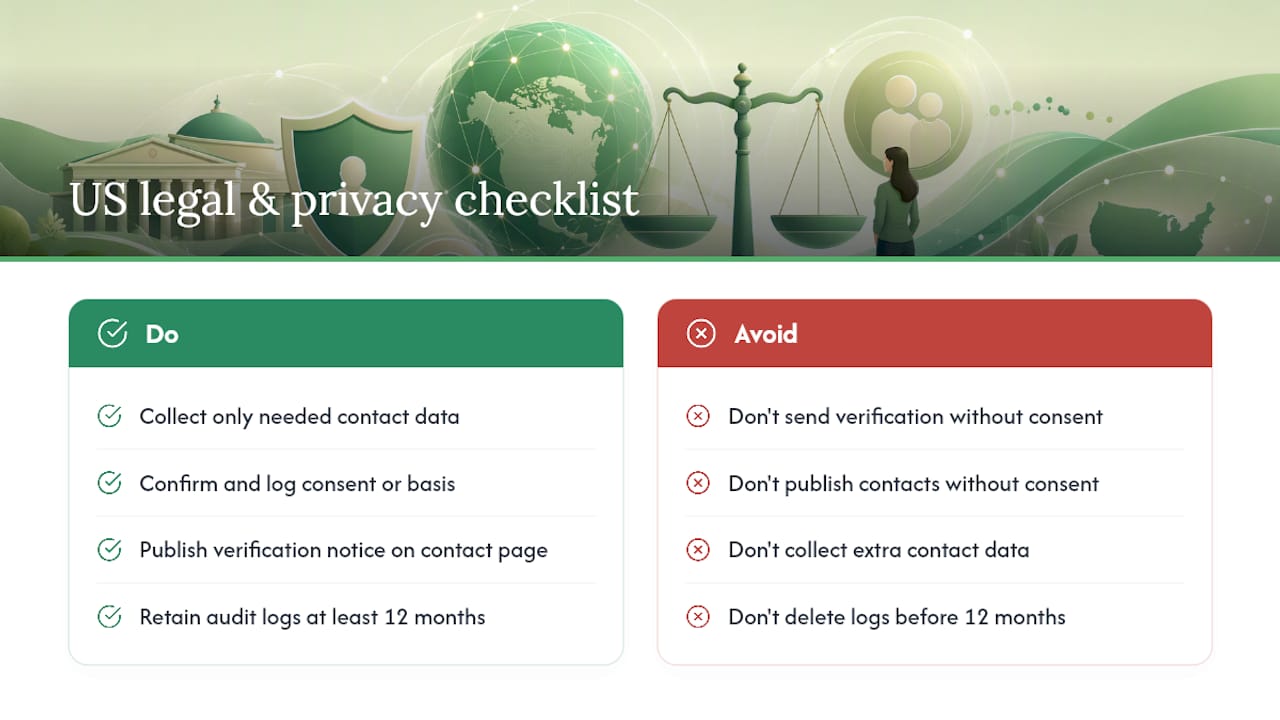
Verifying contact data is required. Publishing it carelessly can create liability.
The CAN-SPAM Act governs commercial email, and the Telephone Consumer Protection Act (TCPA) governs calls and texts, including OTP messages sent during verification. Before sending any verification message, confirm you have consent or a legitimate transactional basis. Keep a record of that consent.
Practical rule: Collect only the contact data you need to verify and respond. Data minimization is not just a GDPR concept; it is sound practice under the FTC Act's unfair or deceptive practices framework. If you collect a phone number to verify it, say so in your privacy notice.
Publish a brief disclosure on your contact page explaining what verification collects and how long you retain it. Retain verification audit logs for at least 12 months, longer if your sector has specific requirements (financial services, healthcare). If you publish a named contact's information, confirm you have their consent, especially for personal email addresses or direct phone lines.
How to measure the impact of contact page improvements
Measure before you change anything. Your baseline numbers are the only way to know whether the work paid off.
- Fraud and dispute rate: — Monitor chargebacks and fraud reports monthly. A drop after publishing verified contact data is a direct ROI signal.
Contact confidence scoring systems refresh on a bi-weekly basis and use cross-validated signals to rank contact accuracy. Apply the same logic to your own page: treat your contact data as a scored asset that needs periodic review, not a static field you set once.
Use heatmaps to confirm visitors are actually seeing your trust signals. If the SLA note sits below the fold on mobile, it is not doing its job.
A realistic 4–8 week plan with cost estimates
Bottom line on timing: Most small businesses can complete a full contact page verification rollout in 4 weeks. Weeks 5–8 are for measurement and tuning, not for catching up on basics.
Week 1: Audit your current contact page against the checklist above. Check WHOIS alignment, test your email and phone, and note every missing signal.
Weeks 2–3: Implement email confirmation (reply link + SPF/DKIM/DMARC) and phone OTP. Add named contacts, photos, and a response SLA. Fix any WHOIS discrepancies.
Week 4: Publish verification signals and badges, add schema markup, and link your Verified fyi trust report. Update your privacy notice.
Weeks 5–8: Run A/B tests, review form completion rates, and re-verify any channels that changed.
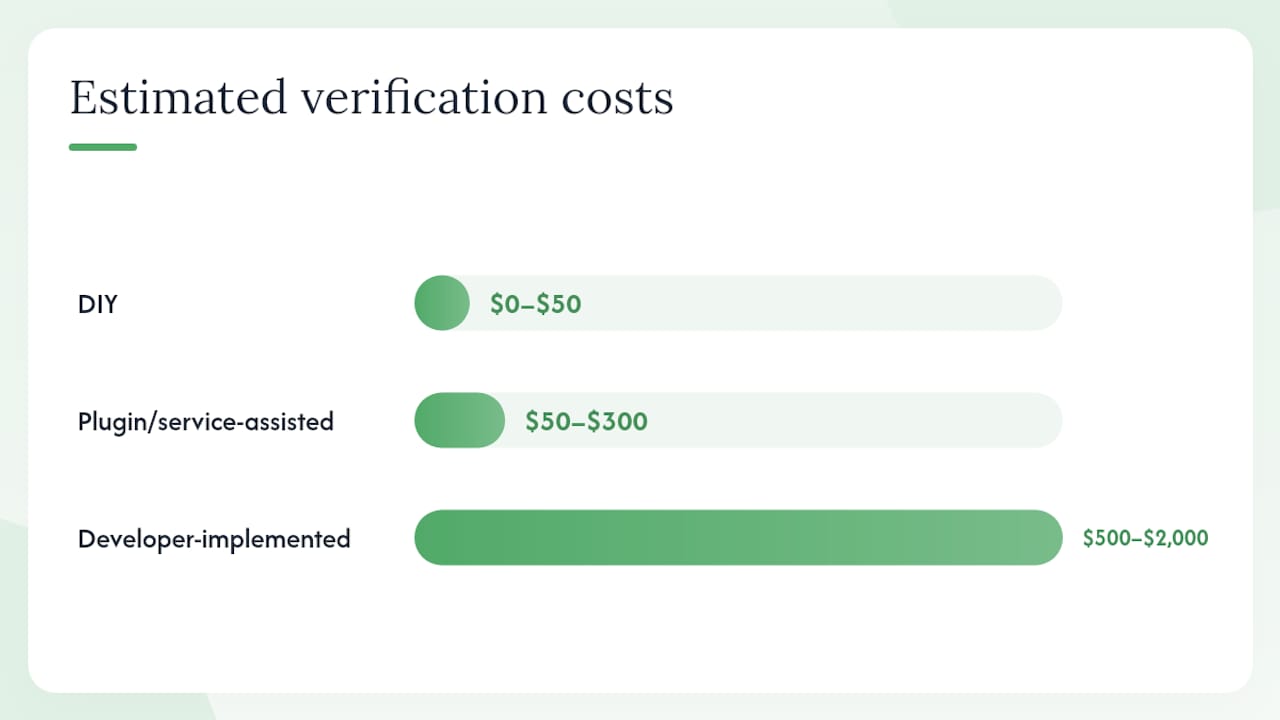
Cost bands:
- DIY: $0–$50 (your time + free schema tools + a Verified fyi report)
- Plugin/service-assisted: $50–$300 (email verification service, OTP provider, schema plugin)
- Developer-implemented: $500–$2,000 (custom verification workflow, structured data, monitoring setup)
Task split: the site owner handles copy and SLA decisions; a developer handles schema and OTP integration; customer support owns the re-verification cadence.
Key Takeaways
A contact page that shows verified email, a live phone number, a consistent address, and a stated SLA is the single fastest trust upgrade a US business can make to its website.
| Point | Details |
|---|---|
| Verify, don't just display | Operational verification (reply link, OTP) beats a correctly formatted but unconfirmed contact. |
| Place trust signals near the form | Badges and SLA notes adjacent to the submit button directly lift form completion rates. |
| Match WHOIS data | Your contact page address must align with domain registration records to pass E-E-A-T and fraud checks. |
| Measure before and after | Track form completion rate, lead quality, and fraud reports to quantify ROI from each change. |
| Run a Verified fyi audit | Paste your URL into Verified fyi for an instant trust score you can link from your contact page. |
The contact page is where trust becomes real
Most articles on this topic treat the contact page as a design problem. It is not. It is an accountability problem. Visitors are not looking for a pretty form; they are asking a quiet question: "If something goes wrong, can I actually reach someone?"
The businesses that answer that question clearly, with verified channels and a stated response time, convert better and attract fewer disputes. The ones that leave it vague pay for it in abandoned forms, chargebacks, and fraud flags.
What I find underestimated is the WHOIS alignment piece. Most site owners never check whether their contact page address matches their domain registration. That mismatch is a red flag in automated trust scoring systems, and fixing it costs nothing. The third-party vetting checklist at Verified fyi walks through exactly this kind of signal, and it takes about ten minutes to run.
Verified fyi gives you a trust report in seconds
Your contact page can claim anything. A Verified fyi report shows visitors that an independent system has checked your site across 200+ signals, including domain ownership, security infrastructure, and reputation data, and assigned a scored verdict.

Paste your URL into Verified fyi and get your trust score now. Then link that report directly from your contact page, next to your verified email and phone, so visitors see third-party confirmation before they ever fill out a form. The methodology page explains exactly how the score is calculated, giving you a transparency link you can publish with confidence. All core checks are free. Verified fyi also partners with security tools like NordVPN and 1Password, so the report page your visitors land on reflects the same trust-first approach your contact page should.
Useful sources and further reading
The sources below support the claims and recommendations throughout this guide.
On machine-readable verification: The IETF's draft
verifiedContactsRDAP extension defines a standard structure for publishing email, phone, and address verification status in domain records, making it easier for search engines and third parties to confirm contact authenticity automatically.
- Verifying Contacts in RDAP — IETF Internet-Draft
- RrSG approach to registration data accuracy — RrSG
- Contact Data Confidence Scores — Crunchbase support
- Why Your Website Needs a Contact Page: SEO, Trust & Compliance — DiarySphere
- Contact Us Page Design: 6 Rules for More Leads | Boundev
- Contact Page Design That Converts: An Expert Guide — Upqode
- Top Signals a Company Contact Page Is Legitimate — Contact.top
- How we score — verified.fyi
FAQ
What makes a contact page "authentic" vs. just complete?
An authentic contact page uses operationally verified channels: an email that responds, a phone that rings, and an address that matches your domain registration. Completeness is about fields; authenticity is about proof.
How does contact page authenticity affect Google rankings?
Google's E-E-A-T guidelines treat consistent, verifiable contact data as a trust signal. Matching your contact page details with your WHOIS registration and external listings strengthens local SEO and reduces the chance of a manual quality review.
What is the fastest way to verify my contact page right now?
Run your URL through Verified fyi for an instant trust score, then cross-check your contact page address against your WHOIS/RDAP record. Both steps take under five minutes.
Do I need a physical address on my contact page?
Not always. A clearly defined service area works for service-based businesses. What matters is that the location data is consistent across your site, your domain registration, and any external directories.
How often should I re-verify my contact information?
Quarterly at minimum, and within 7 days of any change to your email, phone, or address, per RrSG registration data accuracy standards.